
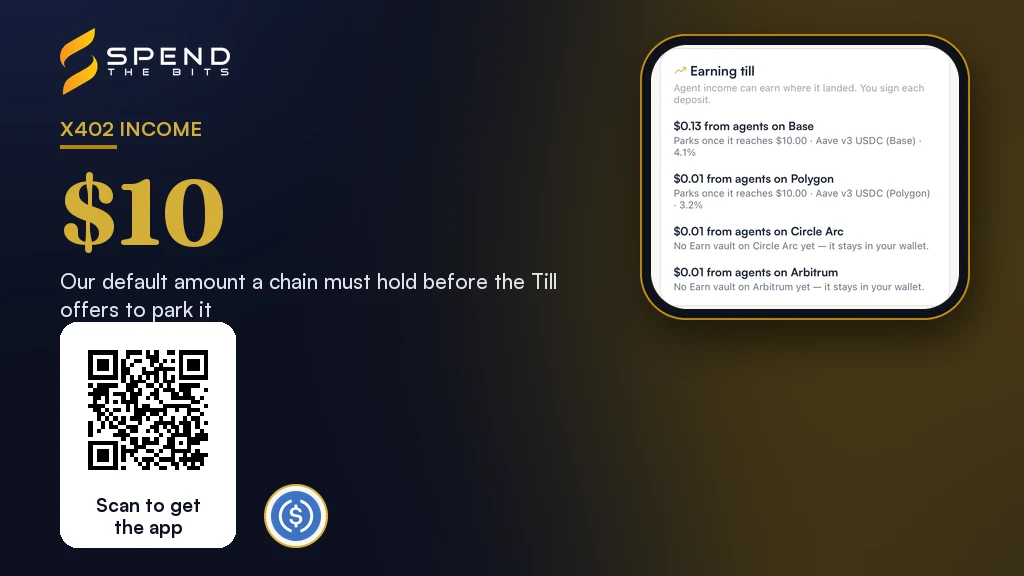
Why x402 income ends up in several places
Each x402 payment settles on the network the buyer chose. When we quote a price, we offer more than one network, and the buyer's client signs for the one it can pay on. One agent pays on Base. Another pays on Polygon. A third holds its USDC on Arbitrum.
After a month of sales, your x402 income is real, but it is scattered. Each chain holds a few dollars, and none of them is earning anything. Adding the balances up in your head is easy. Doing something useful with them is not, because each balance lives on its own chain with its own gas and its own vaults.
Our app used to offer a single button for this. It added up every unswept sale and deposited the total into Earn from your home chain. That sounds tidy, but it was wrong in a way that mattered. Money that arrived on Base stayed idle on Base, while the deposit pulled the same amount out of your Polygon wallet, or failed because that wallet was short. The button also marked sales as swept on the app's word, with nothing on the ledger to prove a deposit had happened. We removed it and built the Earning Till instead.
Step one: the Till groups income by where it landed
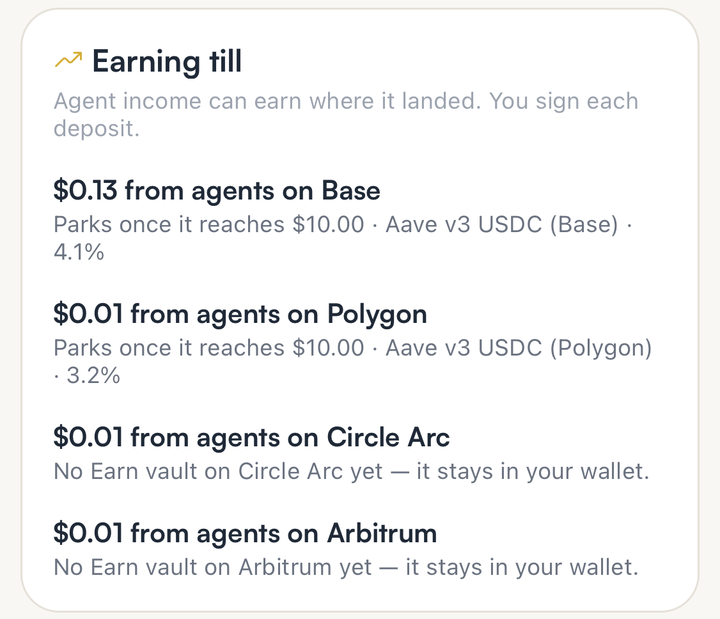
The Earning Till starts from a simple rule. Income belongs to the chain it arrived on. So the Till shows one row per chain: what agents paid you on Base, what they paid on Polygon, what they paid on Arbitrum, and so on.
It also counts only money that really reached your wallet. If a sale went through a revenue split, the split paid a small platform share and any referral share to others, so the Till counts what was left for you. Money still waiting inside a split that has not paid out yet is not in your wallet, so it is not counted either. A test payment on a demo network is never counted on mainnet.
For each chain, the Till then looks for an Earn vault on that exact chain that you are allowed to use and that is taking deposits. If there is none, the row says so plainly: the income stays in your wallet. If the chain is one that Earn does not cover at all, the row says that too.
Step two: park it in a vault on the same chain
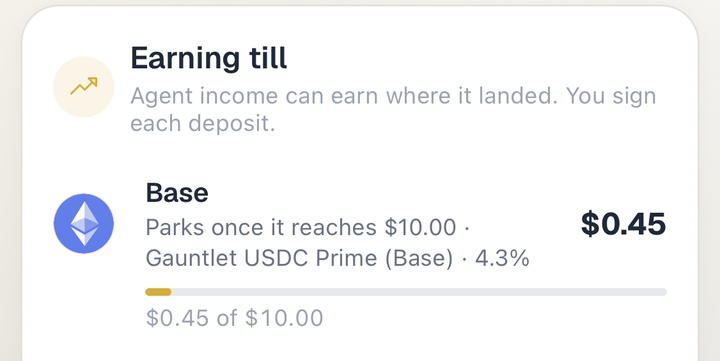
Once a chain holds enough income, the Till offers to park it in a vetted Earn vault on that same chain. The threshold is a small amount by default, and you can raise it. Below the threshold, the row shows a progress bar and the line Parks once it reaches the threshold, so you always know why nothing happened yet.
The vaults behind Earn are standard tokenized vaults. ERC-4626 defines a common interface for vaults that hold shares of a single underlying token [3]. On Aave, supplying an asset lets you earn interest, and you receive aTokens whose balance grows over time from borrowing in the pool [4]. A Morpho vault is a curated lending strategy, where a curator sets the caps and fees [5]. Earn shows the observed rate for each vault and a safety score, and the Till picks the best risk-adjusted vault on the chain.
Parking is never automatic. You tap Park, the device asks for Face ID or your passcode, and your phone signs an ordinary Earn deposit. Your keys never leave the device. There is no robot moving your money in the background, because a key that could do that would be a key someone else holds.
You can also tell the Till to keep some cash liquid on each chain. It never offers to park that part. And if the wallet on a chain holds less than the income it recorded, because you already spent or moved it, the row says spent instead of offering a deposit you cannot make.
How a park is booked, and why it matters
The old button marked sales as swept because the app said so. The Till does it the other way round. A sale is marked parked only against an Earn deposit that our ledger has already recorded, for you, on a vault on that same chain.
That deposit also sets a ceiling. It can cover at most its own amount of income, counted across every request, so a retry or a replay of the same transaction parks nothing twice. The oldest income is parked first. If the app sends the booking before the deposit is recorded, it waits and tries again, and the screen says the deposit is done and will show as parked shortly. It never tells you to deposit again.
This matters for your books. When the Till says income is parked, there is a real transaction behind it that anyone can look up. When it says income is still in your wallet, that is true as well.
One honest note on where this stands. We have tested the Till on test networks and walked every screen in production, but no chain in our own seller account has reached the threshold yet, so a real park on mainnet has not happened. Our own Base income was still well under the threshold when we last looked. We will say so when the first one lands.
Step three: Books turns x402 income into a journal
The Till answers where the money is. Books answers what it was. It reads the same public records and shows two sides for any period you pick: selling and buying.
On the selling side, Books lists sales by resource, the platform share and referral commissions only once they actually left your money, money still held in a split as a receivable, and refunds you gave under Shield in the period they were paid. On the buying side, it lists what you spent, grouped by vendor and by cost centre. Each agent that pays on your behalf is its own cost centre, and purchases you make yourself sit under In-app. So you can see that one agent spent a little on market data while another spent more on reports.
The journal is a CSV with five columns: date, account, debit and credit amounts, and a memo. Every entry balances, and you can export it in a generic shape or one ready for QuickBooks or Xero. To keep the file small, sales are grouped into one entry per day per resource, and purchases into one per day per cost centre and vendor.
The journal is also safe to open. Resource names and agent labels are written by people and by agents, and a spreadsheet treats a cell that starts with an equals sign as a formula. That is called CSV injection [6]. Books puts a single quote in front of any cell that starts with one of those characters, so a hostile label opens as text, not as a formula [6].
Accounting for x402 income: what your accountant will ask
This is not tax or legal advice, and the rules depend on where you live. But the shape of the question is the same almost everywhere. In the United States, the IRS says that receiving virtual currency for services is ordinary income, measured at its fair market value in dollars on the day you receive it [2]. For an independent contractor, that income is self-employment income [2].
That is why accounting for x402 income starts with the date and the amount of each sale. Books gives you both. Because x402 income is paid in USDC, a dollar stablecoin, the dollar value on the day is usually simple to state, but your accountant should still confirm how to value it in your case.
Parking income in a vault is a separate step. The deposit and any interest the vault pays later are their own events, and our wider CFO Books export covers them. Import the x402 lines from one journal, not both, so nothing is counted twice.
Getting started
If you already sell a resource, the Earning Till is on the Get paid by agents screen, and Books is one tap below it. Nothing needs to be switched on. Reminders are off until you ask for them, either by opening the Till or by choosing to sweep a resource to yield, and then they come at most once a day when a chain is ready.
If you have not started selling, our guide to getting paid by AI agents walks through the setup, and monetizing an API with x402 covers pricing. For repeat buyers, read how x402 passes work. The agents page lists everything a seller can turn on, from referral shares to refund windows.
In the app · 4 steps
Find the Earning Till and Books in SpendTheBits
Both live on the screen where you already sell to agents. Here is what each part shows.
See income by the chain it landed on
Open Get paid by agents and scroll to Earning till. Each row is one chain, with the vault it would use or a note that the money stays in your wallet.
Watch a chain fill toward your threshold
Below the threshold, which is $10 unless you change it, a row shows how far it has to go. Once a chain is ready, tap Park and sign the deposit on your device.
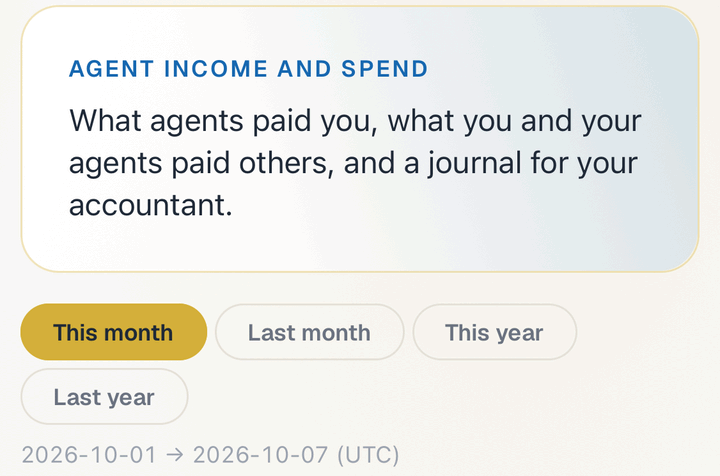
Open Books and pick a period
Books shows what agents paid you and what you and your agents paid others, for this month, last month, this year or last year.
Share the journal with your accountant
Choose the generic, QuickBooks or Xero shape and tap Share journal. Every entry balances, and each agent you pay is its own cost centre.
Hold your own keys, keep the yield, skip the middleman.
SpendTheBits is a fully non-custodial wallet for 13 chains, free on iOS and Android.