
What a pay-to-unlock page actually does
A pay-to-unlock page is a small web page with a price, a short description and a button. You choose what sits behind the page: a private download link, a document, or a block of text. The page shows the price in US dollars and asks the buyer to pay in USDC, the dollar-pegged stablecoin issued by Circle [3]. There is no store front, no catalogue and no seller account for the buyer to create.
The buyer does not need a SpendTheBits account either. To prove they are a real person, they confirm an email address with a six-digit code, then pay. Once the payment is confirmed, the page reveals the link or note. The whole flow is built for a one-off purchase, which suits a template, a guide, a short course file or a piece of writing that you want to sell by itself. A buyer who lands on the page does not have to learn a new app or set up a profile first, and that alone removes a step that loses many potential sales.
Because the page is yours and the price is yours, you keep control of the sales relationship. You decide what the buyer sees after paying, and you can change the page or take it down whenever you like. What you cannot do, by design, is change a sale that has already gone through, and that is the subject of the next section. Keep that boundary in mind as you write your product description, because the page is where the promise to the buyer is made.
How the buyer pays with a signature
Most people think of a payment as a transaction the payer sends from their wallet. Pay to unlock can use a different route called an authorization. The buyer signs a message that says, in effect, that they allow a specific amount of USDC to move to a specific address, within a time window. The message is not a transaction and it does not move money by itself.
It lets a token holder approve a transfer by signing a typed message, and lets someone else submit that signature on chain [1]. The standard describes a nonce that is random and single use, plus a valid-after and valid-before window, so a signature cannot be replayed forever [1]. In practice this means the buyer pays by signing, and the network fee is handled separately rather than being a barrier for the buyer. For the full mechanics, read our explainer on EIP-3009 transferWithAuthorization.
For a creator this matters because it removes a common cause of abandoned sales. A buyer who has never held gas tokens can still complete a purchase. The payment still settles on chain, and the authorization limits what can be moved, so the signature cannot be used for any other amount or any other address. A signature is therefore narrow by design: it names the amount, the payee and the expiry, and nothing else. That narrowness is part of why the flow is safe to offer to strangers.
Where the money goes and why it cannot be pulled back
Each order on a pay-to-unlock page pays a payout contract that nobody owns. That contract is written so that it can only pay the creator's own address. SpendTheBits is a self-custody wallet, so it does not hold customer funds and there is no company account where money waits. Once the buyer's payment lands, it is in your wallet, under the rules of the contract.
This is also why a sale is final. On a public blockchain, a completed transfer is recorded permanently, and nobody, including us, can reverse it by pressing a button. Pay to unlock refunds are never automatic. If you decide to refund a buyer, you send the money back yourself from your own wallet, and your phone signs that transfer. The sale stays on the record, and so does the refund. Anyone can later check both entries on a block explorer, which is a useful kind of honesty for a small business.
For a small creator, that trade-off is worth understanding up front. Final sales protect you from a buyer who claims they paid by mistake and wants the money back, because there is no central party that can be pressured to reverse it. The cost is that you have to be fair about refunds, since the choice to give one back is entirely yours. Write your refund stance on the page itself, so a buyer knows what to expect before they pay rather than after.
Setting a price and running the page
Pricing a file or a note is less about the mechanics and more about what the buyer expects to receive. A short template might sell for a few dollars, while a longer guide or a set of working files might justify more. The buyer sees the same amount you set, which keeps the offer simple to compare with other things they buy.
Keep the page honest about what is included. Say what the file is, how big it is, what format it comes in and whether there are any licence terms on how it can be reused. A clear description cuts down on refund requests, and it also helps a buyer decide quickly, which can lift the share of visitors who finish paying. If you want to sell to people who do not hold crypto yet, point them to our guide on the best wallet for holding USDC so the first step is not a surprise. A short explainer on the page can also say that the payment is a one-off, which heads off the confusion some buyers feel about recurring charges.
Check your page the same way a buyer would. Make a test purchase with a small amount, confirm the content appears after the code and payment, and confirm the money reaches your address. Then decide whether to share the link widely. The first few sales are a useful check that the flow works for real people, not just for you. If a step confuses you while testing, it will confuse a buyer too, so fix the wording before you promote the page. You can also review how the wallet itself works in our self-custody overview.
Fees, limits and what is not included
There is no SpendTheBits fee on Pay to unlock sales today, so the price you set is the amount the payout contract is built to send to you. Network gas is separate and is paid in USDC on the chain you use. On Arc, a USDC transfer is designed to cost a fraction of a cent, which is part of why small prices make sense on it [2]. Gas is small, but it is still a cost, so factor it in if you price very low.
There are limits you should know about. Card payments are not part of this product, so a buyer who only has a card cannot pay on a Pay to unlock page. Buyers need USDC in a wallet, and they need to be willing to confirm an email. Refunds are not automatic, and a completed sale cannot be taken back by anyone. These are the honest trade-offs, and they are the reason a pay-to-unlock page suits some creators better than a card-based store. If your audience mostly pays by card, a different model may fit better.
If you want a deeper look at the signature mechanism, the EIP-3009 explainer covers it in detail. If you plan to sell repeat access rather than one-off files, the article on subscriptions and passes is the next step. For a wider view of where stablecoins fit, the guide on what a non-custodial wallet is covers the basics. Pick the model that fits the product, and keep the sale final rule in mind as you set your terms.
In the app · 3 steps
Sell a link or a note with Pay to unlock in SpendTheBits
Pay to unlock lives under Arc tools. Here is the path from a new item to a sale.
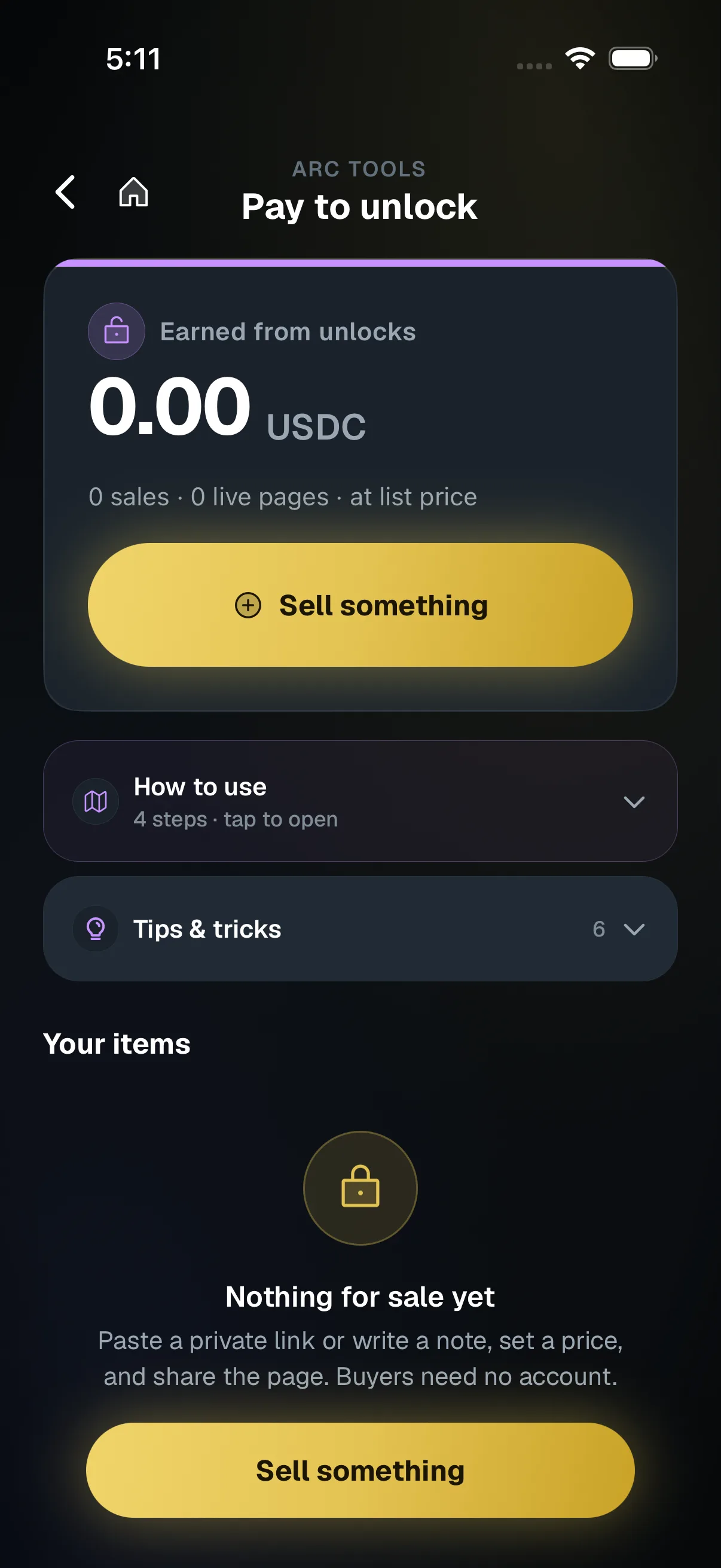
Open Pay to unlock
Go to Arc tools, then Pay to unlock, and tap Sell something.
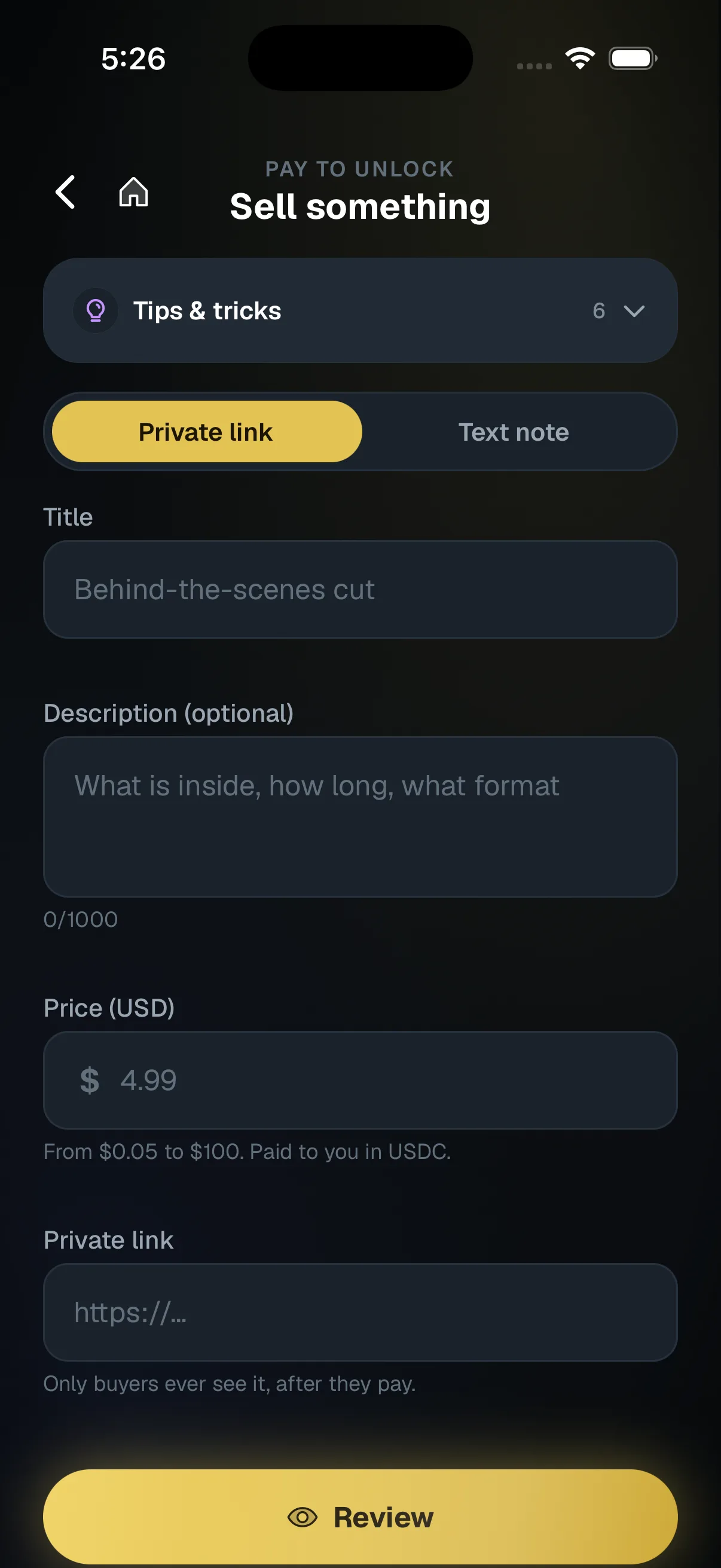
Describe it and set a price
Pick Private link or Text note, then add a title, an optional description and a price in dollars.
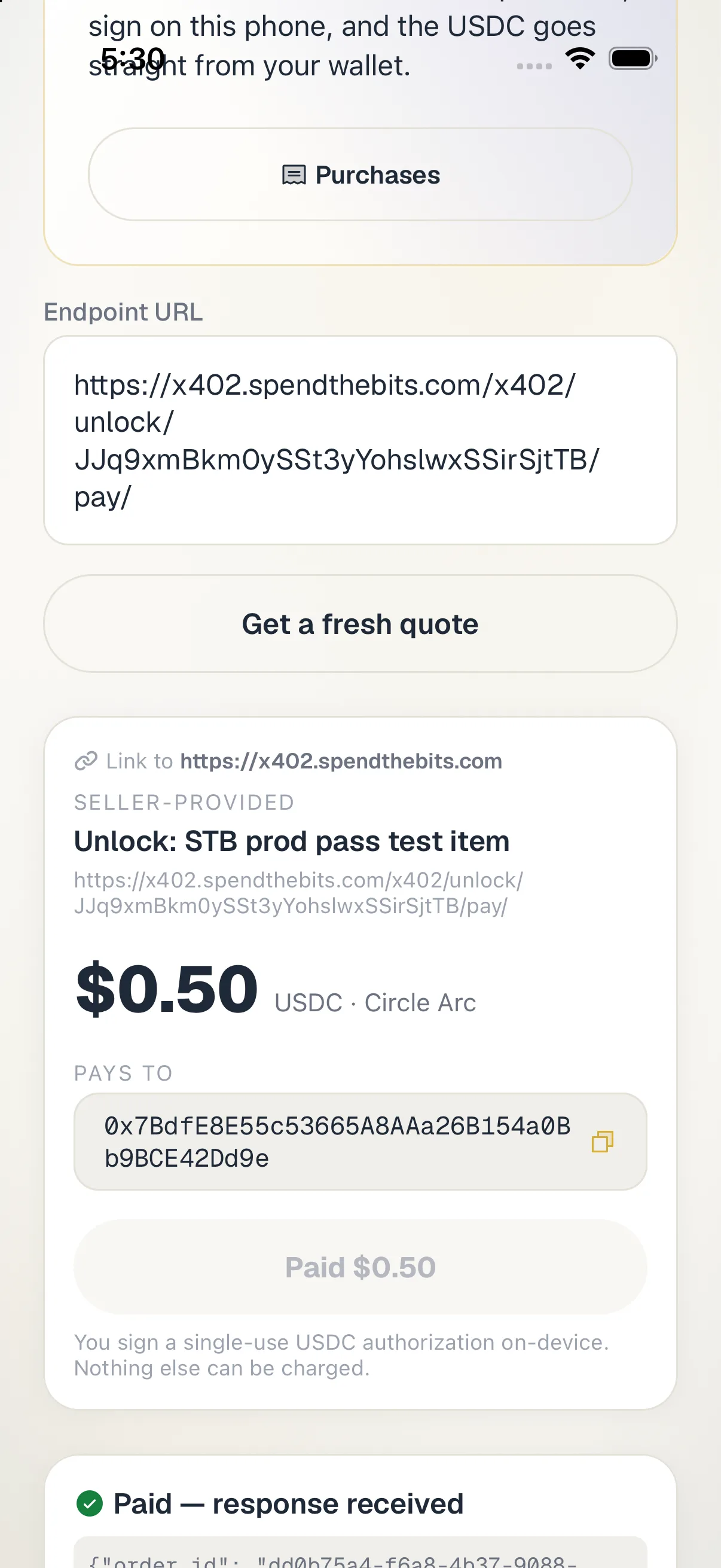
The buyer pays and opens it
Your buyer opens the page in a browser, confirms an email code, pays in USDC and opens what they bought.
Hold your own keys, keep the yield, skip the middleman.
SpendTheBits is a fully non-custodial wallet for 13 chains, free on iOS and Android.