

Two kinds of wrong address
There are two ways an address can be wrong, and they need different defenses. The first is a typo: a character dropped, swapped or misread. The result is usually an address nobody controls. The second is a valid address that belongs to the wrong person, often a scammer who planted it in front of you.
Typos are the easier problem, because modern address formats carry checksums. A wallet can spot most typing errors before anything is signed. The second problem is harder. A scammer's address is perfectly valid. No checksum will ever flag it, because nothing about it is broken.
So when you verify a crypto address, you are really asking two questions. Is this a well-formed address on the right network? And is this the address of the person or business I mean to pay? Software helps a lot with the first. The second needs your attention.
What checksums catch on Ethereum and Bitcoin
Ethereum addresses use EIP-55, a checksum hidden in the mix of upper and lower case letters. The rule hashes the lowercase address and capitalizes a letter when the matching bit of the hash is set [1]. On average there are 15 check bits per address, and a mistyped address has about a 0.0247% chance of passing by accident [1]. That is why a good wallet warns when the case pattern does not match.
There is a catch. An address written all in lowercase carries no case checksum at all, so a wallet cannot use it to catch a typo. If you are given an all-lowercase address, rely more heavily on the other checks below.
Modern Bitcoin addresses use Bech32, which starts with bc on mainnet and tb on testnet [2]. Its checksum guarantees it will detect any error affecting at most 4 characters, with less than a 1 in a billion chance of missing larger errors [2]. Decoders must also refuse an address that mixes upper and lower case [2]. One caution from the same document: the checksum is not always robust against inserting or deleting fewer than 5 consecutive characters [2]. Strong, but not magic.
The look-alike address that passes every check
Address poisoning is the scam that checksums cannot stop. Etherscan describes attackers who create deceptive transactions in a victim's history so the victim later sends funds to the wrong place [3]. They use a vanity address generator to make an address that closely resembles a real one at the start and the end [3].
The trick depends on habits. Many wallets shorten addresses in the middle, so the look-alike appears identical. Attackers may send a zero-value token transfer, or tiny amounts of real tokens, so their address shows up in your recent activity [3]. Later you copy the latest address from your history, assuming it is the one you used before [3].
Look-alikes are cheap to make for the start and end of an address, and very hard to make for the whole thing. That is the weak point to exploit. A match across every character is strong evidence. A match on the ends alone is almost no evidence at all, however familiar it feels.
The lesson is that the first four and last four characters are not a check. They are exactly what a scammer copies. For a longer look at this scam, read our piece on address poisoning.
A checklist to verify a crypto address
Start with where the address came from. Use the recipient's own app, their saved contact in your wallet, or a page you reached yourself. Avoid copying from your transaction history, an old chat, or a message that says the payment details have changed. Etherscan suggests using a wallet's contact list or whitelist feature instead of retrieving addresses from history [3].
Next, compare the whole address. Read it in chunks of four or five characters against the source, from start to finish. Ethereum's security guidance is to make sure the address exactly matches the recipient's before sending [4]. If you are reading it to someone over the phone, have them read it back to you, not the other way round.
Then check the network. The same address format can exist on several chains, and the same token can live on several networks. Ask which network the recipient expects, and pick it on purpose. Sending on a network the recipient does not watch can leave the funds hard or impossible to reach.
Finally, look at what you are paying. Is the address a person, a business, or a token's own contract? Sending tokens to a token contract is a classic way to lose them. If anything looks off, stop and confirm through a second channel you already trust.
Copy, paste, scan: where addresses get swapped
The address can also change between the source and your wallet. Malware on a computer can watch the clipboard and replace a copied address with one that looks similar. A QR code on a poster or a screen can be covered by a sticker. A request link in a message can be edited before it reaches you.
None of these attacks change the rule. After you paste or scan, read the address in the wallet itself, against the original source, before you sign. If the wallet shows the address on its review screen, that is the copy to check, because that is the one you are about to pay.
Requests from a business deserve one extra step. A message that says the payment details have changed is a classic fraud pattern. Call the business on a number you already have, not one in the message, and ask them to read the new address back to you.
The small test send, and when to skip it
For a large first payment, send a small amount first and ask the recipient to confirm it arrived. It costs one extra network fee and a few minutes. In return, it proves the address, the network and the recipient's access all at once.
A test send is not proof against every scam. If the scammer controls the address, they can happily confirm the test. So a test send checks the plumbing, while the checklist above checks the person. Use both when the amount matters.
You can skip the test for a small payment to someone you pay often, if the address comes from a saved contact. The goal is not ritual. It is to spend your caution where a mistake would hurt.
Keep a record of what you checked. A note of the source, the network and the test result takes a minute. For a business, that note shows how you tried to verify a crypto address if a payment is ever questioned later.
How SpendTheBits checks the address with you
SpendTheBits builds several of these checks into the Send screen. Before a send goes out, it warns in plain words when the address looks almost identical to one you have paid or saved, a possible address-poisoning scam. It warns when it is the first time you are sending to that address, and when a first payment to a new address is a large amount, in which case it suggests a small test send first.
It also warns when the address is a token's own contract, since tokens sent there are almost always lost, and when the address has been publicly reported as a scam or wallet drainer. Every recipient is risk-screened before a send goes out. Tiny inbound transfers from a look-alike of an address you already paid are hidden from Activity and never trigger a notification, so they cannot sit in your history waiting to be copied.
If you want a firmer rule, spending guardrails can require an allowlist for sends above an amount you choose, and a newly added recipient must wait out a cooldown first. See how guardrails work, or the security overview for the full model. The keys stay on your phone, and every transaction is signed there.
In the app · 3 steps
Check an address before you send in SpendTheBits
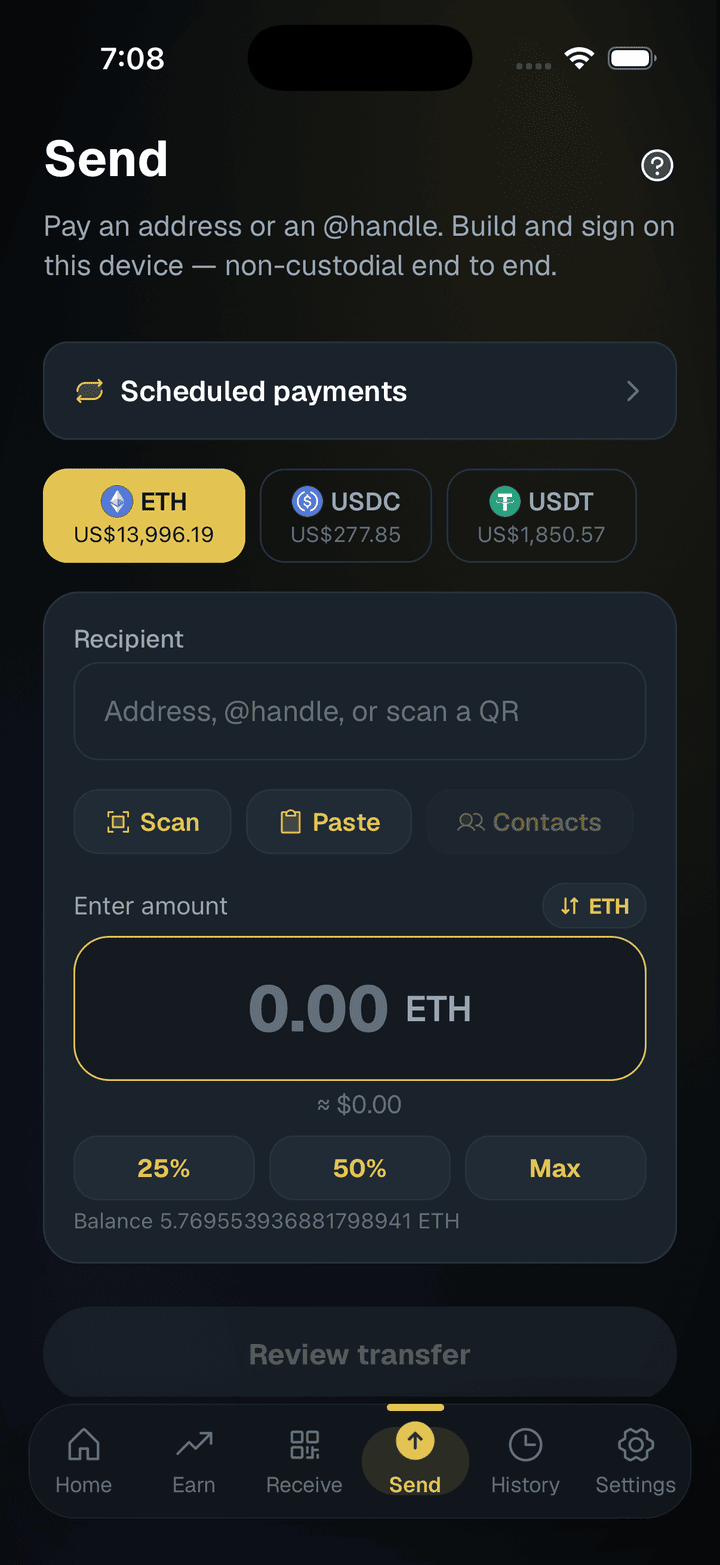
The Send screen runs these checks with you. Here is where they show up.
Paste and read the warnings
Open Send and enter the address. Warnings appear for a look-alike, a first-time address, a large first payment, a token contract or a reported scam.
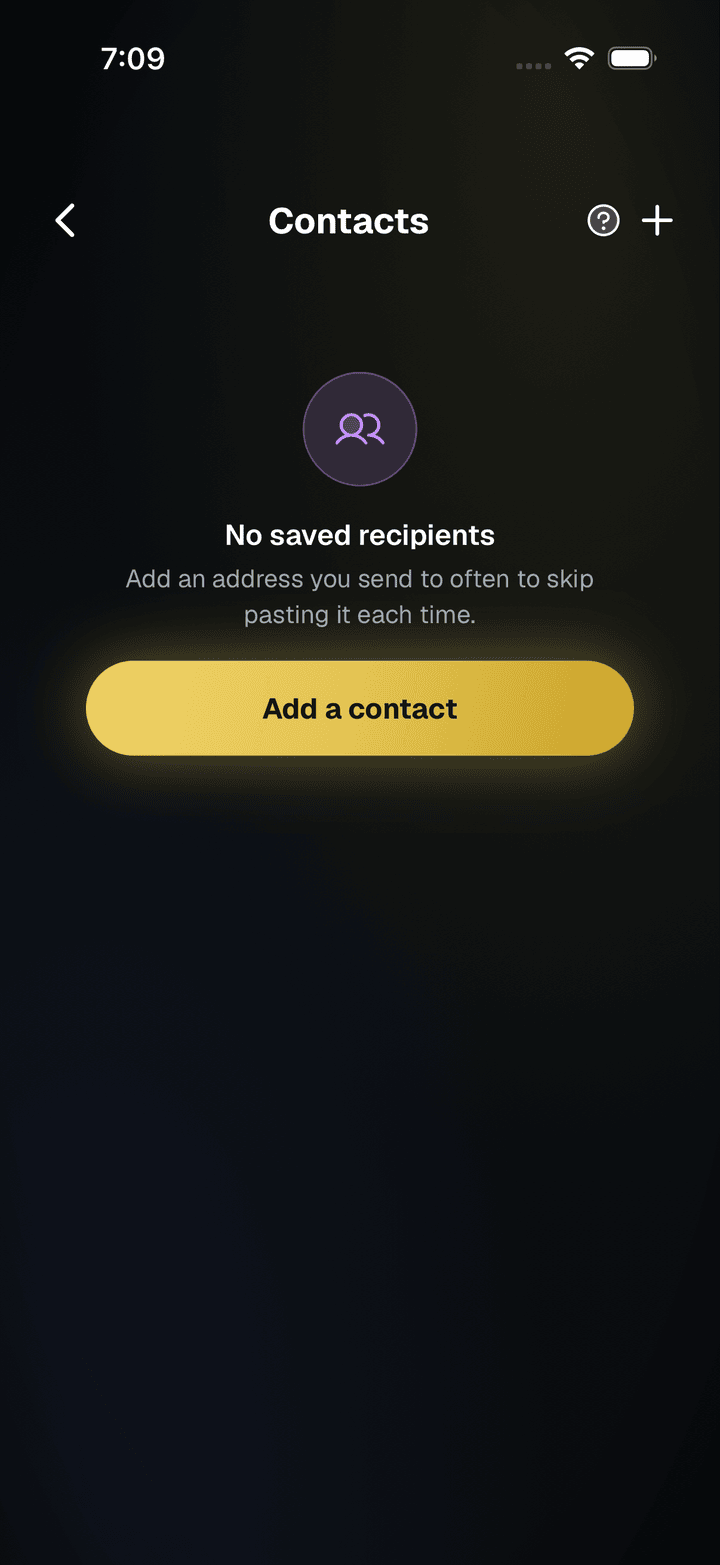
Pay saved contacts
Pick the recipient from your saved contacts instead of copying from your history.
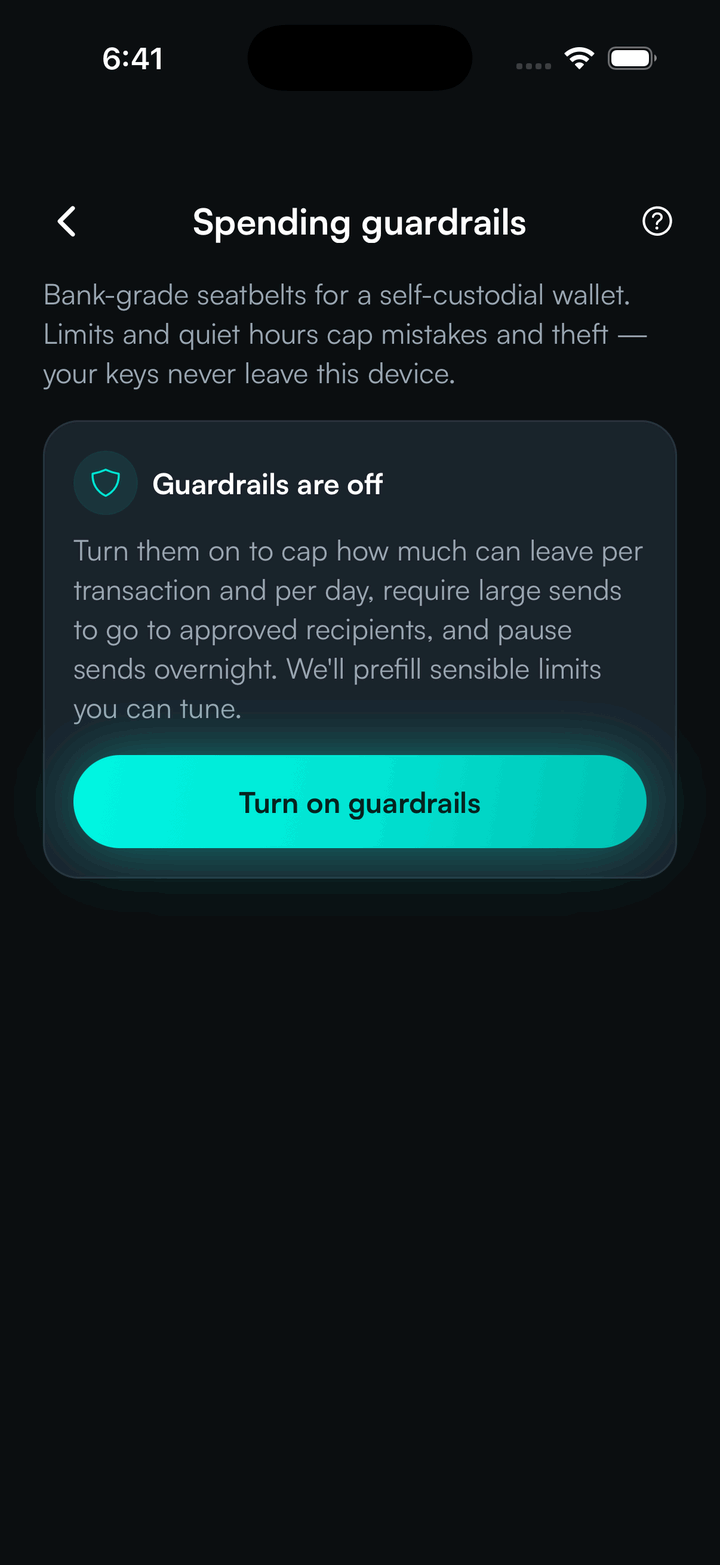
Add an allowlist
Guardrails can require an allowlist for larger sends, with a cooldown before a new recipient can be paid.
Hold your own keys, keep the yield, skip the middleman.
SpendTheBits is a fully non-custodial wallet for 13 chains, free on iOS and Android.