

Model one: a pot of money the agent controls
In the budget model, the agent holds its own key and its own balance. You move a set amount to it, the way you would hand a petty cash tin to a new hire. The agent then pays sellers without asking. When the money runs out, it stops.
The appeal is speed. An x402 payment is a signed message, and the buyer can sign it in a moment [1]. With EIP-3009, the signature authorizes a transfer of a set value to a set address, and someone else can submit it and pay the gas [3]. No person has to wake up for a one-cent data call at three in the morning.
The cost is that the agent decides alone. If its prompt is poisoned, or a seller lies about a price, it may pay before anyone sees. The budget caps the damage, but it does not judge each purchase. That is the trade you accept.
There is a second, quieter cost. Money parked with an agent is money you are not using elsewhere. Keep the pot small and refill it often, and the idle balance stays small too. A budget that is too large invites the very loss it was meant to cap.
Model two: the agent asks, a person approves
In the ask-to-pay model, the money stays with you. The agent finds what it wants, then sends you a request: this seller, this price, this reason. You look, then approve or decline. Only an approved request becomes a payment.
The x402 docs lean this way at the moments that matter. They tell clients to re-run payment policy checks or request user approval when the scheme, network, amount, asset or payee changes on a retry [1]. They also say that after a payment signature is sent and the outcome is unknown, a client should not quietly sign a second one [1].
The cost here is your time. Every request lands on your phone. If the agent makes forty small calls a day, you will either approve them without reading or turn the agent off. Approval only protects you while you still read what you approve.
An ask is only as good as the screen it lands on. A request that only says "pay this seller" tells you almost nothing. A good request answers four questions at a glance: who gets paid, how much, for what, and whether anything about it is new.
The last question does the most work. A seller you pay every day at the same price is boring, and boring is good. A seller you have never paid, a payee address that differs from last time, or a price far above the usual is worth ten seconds of your attention. If the screen flags those cases in plain words, you will read the flagged ones and skim the rest.
What each model protects you from
Think about failures, not features. A budget protects you from a large loss. Even a fully hijacked agent can only spend the pot. It does not protect you from many small bad payments inside the pot. A seller who quietly doubles a price can drain a budget a little at a time, and nothing in the pot itself will notice.
Ask-to-pay protects you from a bad purchase, as long as you notice it. A request that names a seller you have never heard of, or a price ten times the usual, is easy to catch on a screen. It does not protect you from approval fatigue, and it does nothing if the agent can reach your wallet some other way.
Both models lean on the same fact: a signed payment names the payee and the amount. The x402 specification lists the fields a seller sends, including the amount, the asset, the network and the payTo address [2]. The EIP-3009 signature covers the recipient, the value and a validity window, plus a random nonce [3]. Whoever signs, those fields are what you are agreeing to. Read them, or have software read them for you.
A simple rule for splitting the work
Most teams do best with both models at once. Here is a split that holds up in practice. Put routine, cheap, repeated calls on the AI agent budget: the same data API, the same price, many times a day. Put everything else behind an ask.
Everything else means a seller the agent has never paid, a price well above that seller's normal, a change of payee, or any single payment above a line you choose. These are exactly the cases where a person adds value. They are rare enough that you will still read them.
Speed matters too. An agent waiting on you is an agent doing nothing. Decide ahead of time how long a request may wait before it simply expires, and tell the agent what to do then. Dropping the task is usually safer than retrying with a new price.
Size the budget to a loss you could shrug off. A week of normal spending is a fair start. Refill it on purpose rather than giving it a big balance once. If you run a team, write the line down, so the next person who sets up an agent uses the same rule. The AI agent builders page has more on day-to-day setups.
Where the rules actually live
This is the part that is easy to get wrong. A rule only binds an agent if something the agent cannot skip enforces it. A balance at an address is enforced by the chain itself. A rule held by a server is enforced only when the agent checks with that server first.
AP2 makes the same point with signed mandates. Its open payment mandate records the user's limits, such as a budget and allowed payment methods, for autonomous runs [4]. A closed mandate captures approval for one specific amount on one finalized checkout [4]. Those records give a verifiable audit trail [4], but a merchant that never checks them is not stopped by them.
So treat software rules as a seatbelt, not a wall. The wall is how much money the agent can physically reach. Keep that small, and add rules on top for the cases you want a person to see. Our explainer on agent spending limits goes deeper on why a chain-enforced limit beats a promise.
How SpendTheBits sets up both
In SpendTheBits, an AI agent budget starts with a key created on your phone, never derived from your seed phrase and never sent to SpendTheBits. The agent's spending limit is the USDC you choose to put at its address, so the chain enforces it. Topping up is an ordinary send, and you can switch an agent off at any time.
On top of that pot, SpendTheBits offers budget rules for agents that check a payment first: the most per payment, the most in 24 hours, allowed sellers, and an amount above which you are asked. Approving such a payment moves no money from your own wallet. These rules are cooperative. An agent that skips the check is limited only by the USDC at its address.
Before a request reaches you, SpendTheBits checks it for a seller you have never paid, a price far above that seller's usual price, a changed payout address, a lookalike web address, a duplicate and an authorization that stays valid too long. You choose whether an unusual request is shown to you or blocked. Every answer is written to your Agent activity record, allowed, waiting or blocked, with the rule that decided. See the agents page for the full picture.
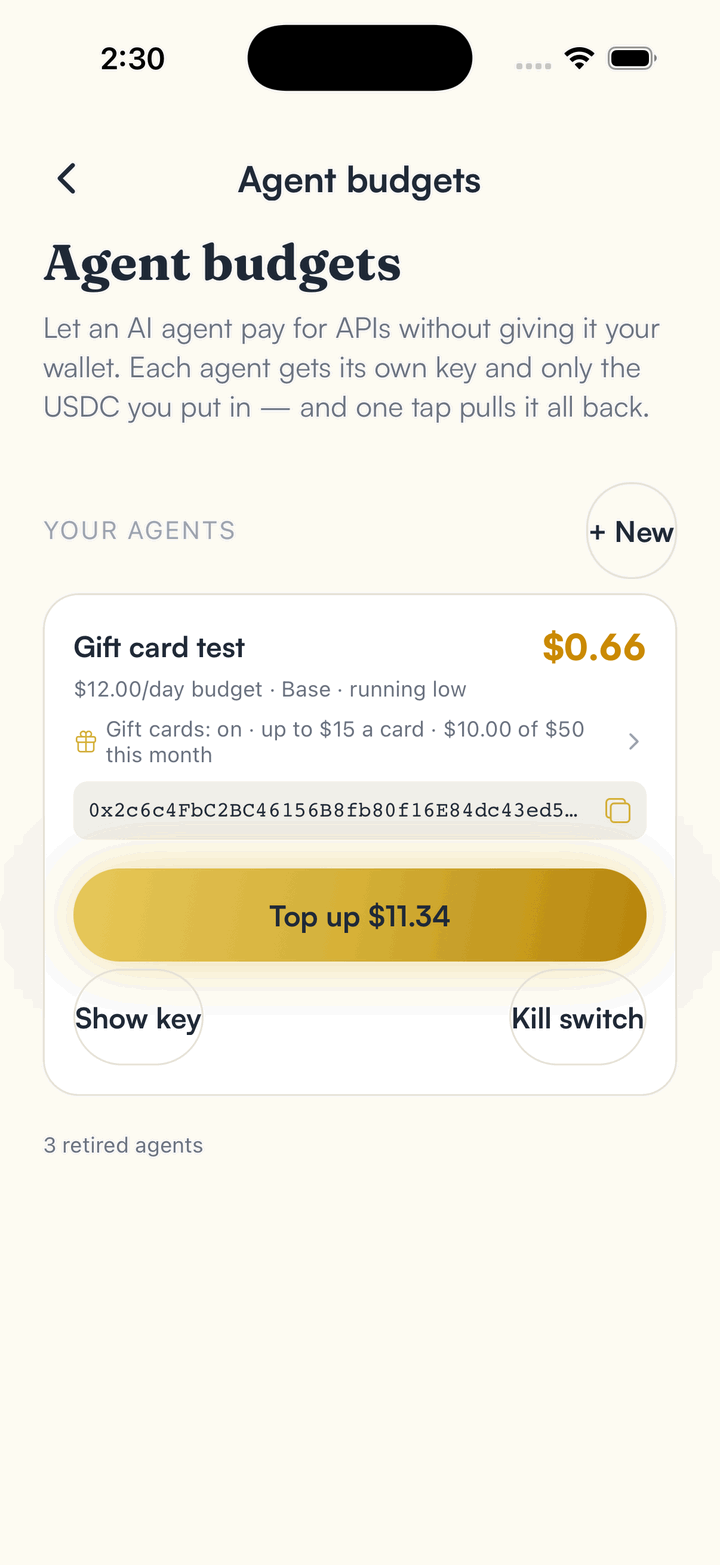
In the app · 3 steps
Give an agent a small budget, and keep the unusual ones for you
Agent budgets live in the app. Here is the path from a new agent to seeing what it was allowed to buy.
Create the agent
Open Agent budgets and tap New. The agent gets its own key, and its budget is the USDC you put at its address.
Answer the requests that need you
When a purchase needs your say, the app shows what the agent wants and the price. Approve or decline.
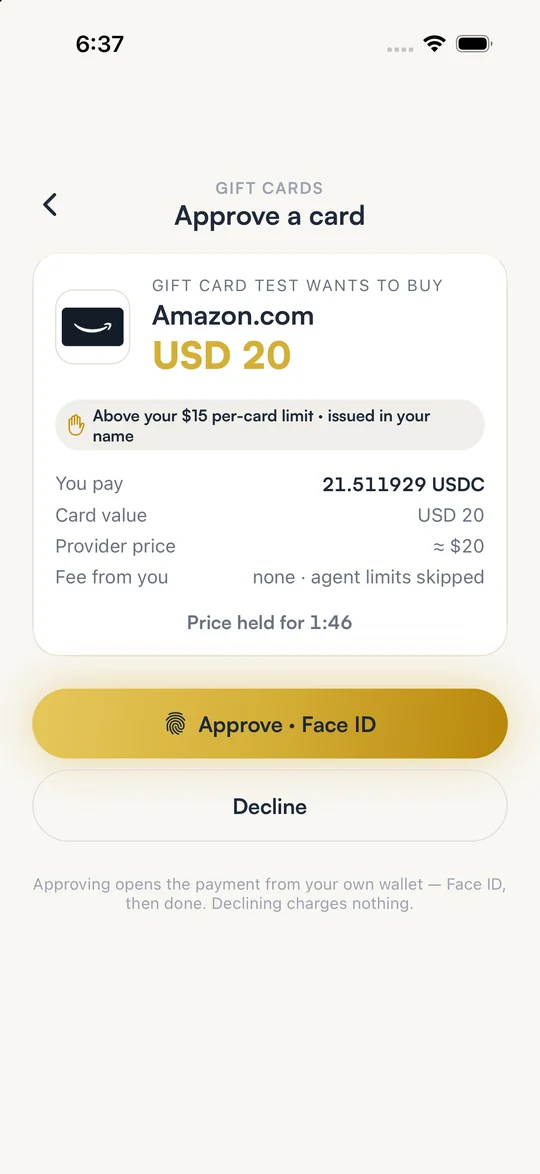
Review what it bought
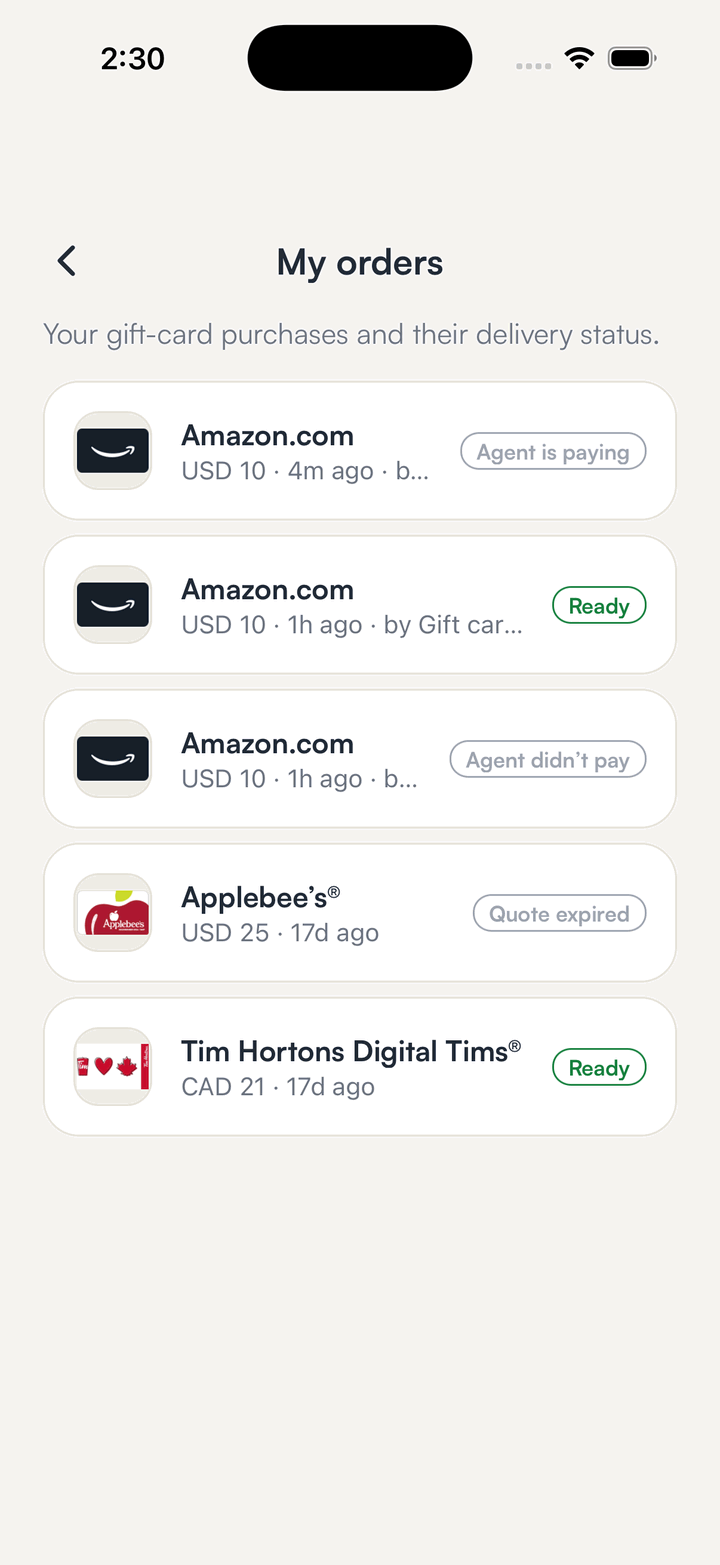
Orders by agent show each purchase, so you can tell which agent spent what.
Hold your own keys, keep the yield, skip the middleman.
SpendTheBits is a fully non-custodial wallet for 13 chains, free on iOS and Android.