

Why an agent should never share your wallet
The easy path is to hand an agent the same key you use yourself. It works on the first day and fails on the first bug. If the agent is tricked by a hostile web page, or just misreads a price, it can spend everything the key can reach. Your savings, your gas coins and your test funds all sit behind one signature, and the agent holds that signature.
A separate key changes the math. The agent can only touch what sits at its own address, so the worst case is capped by what you put there. This is the same logic as giving a contractor a petty cash box instead of the company bank card. You still get the work done, and a mistake costs a fixed, known amount that you chose in advance.
A shared key also makes revocation painful. If you suspect the agent has gone wrong, you cannot cut it off without changing the key that guards everything else. With a dedicated key, you simply stop funding it, and every payment from that address is clearly the agent's. If you want the wider picture of how this fits an agent workflow, our agents overview lays out the pieces.
How x402 lets an agent pay over HTTP
x402 is an open standard for internet payments that is built on HTTP [2]. The idea is plain. An AI agent wallet pays in a simple loop: the agent asks a server for a resource, and the server answers with a 402 Payment Required status that describes the price [2]. The agent then retries the request with a signed payment attached, and the server returns the data once payment checks out [2].
Nothing here needs a checkout page, a card form or a signup flow [1]. That matters for machines, which cannot fill in forms. x402 is meant to cover a human unlocking premium content, a backend buying metered data, or an agent purchasing a tool call in the middle of a task [1]. A facilitator verifies and settles the payment so the seller does not have to run chain infrastructure [1].
The protocol also states a trust rule: no payment scheme may let the facilitator or the resource server move funds except as the client intended [2]. For a builder, that is the property that makes agent spending safe to reason about. The standard describes schemes such as exact, which pays a set amount, and upto, which authorizes a maximum that the seller settles against real usage [2]. For a longer walk through the flow, see what x402 is.
For an AI agent wallet, the relevant fact is that Coinbase's developer docs say x402 turns an API or digital service into a paid resource [1]. They add that a buyer sees the price, pays, and gets access without leaving the request flow [1]. The same page says there is no checkout page, card form, or signup flow [1]. The x402 repository describes the protocol as an open standard for internet native payments [2].
The signature format behind these payments is ERC-3009, which describes itself as a way to transfer fungible assets via a signed authorization [3]. For an AI agent wallet, the standard says this lets a user delegate the gas payment to someone else [3]. It also lets a user transfer ERC-20 tokens to another address, and have the recipient submit the transaction [3].
What the signed EIP-3009 authorization actually does
On EVM chains, the signature an agent produces for an x402 payment is an EIP-3009 authorization, and SpendTheBits' own x402 flow uses exactly that. ERC-3009 defines a transfer made through a signed message instead of a normal on-chain call [3]. The signer commits to who pays, who receives, how much, and a window of time in which the transfer is valid [3].
Two details are worth knowing. First, each authorization carries a random 32-byte nonce, so many can be prepared at once without clashing [3]. Second, the spec lets someone else submit the transaction, which means the signer can delegate the gas payment [3]. That is why a buyer using EIP-3009 pays no gas of its own, as we describe in our explainer on transferWithAuthorization.
The authorization is also bounded by time. An agent can sign something valid for an hour, and after that it is dead paper.
Still, a signed authorization only spends what the address holds. The signature is the how; the balance is the ceiling. That is the whole reason a funded address works as a limit. However clever the agent is, the token contract cannot pay out money the address does not have.
A limit the server promises versus a limit the chain enforces
Most spending caps today are promises. A dashboard offers a budget alert. A card has a limit set by a bank. In each case a third party holds the rule, and your protection depends on their code being right, their policy staying the same, and their systems being up.
A chain-enforced limit works the other way. If an agent address holds a fixed amount of USDC, the network will reject any transfer larger than that balance, no matter what the agent, the seller or any server wants. There is no policy to misconfigure, because the rule is arithmetic that every node applies. The agent cannot overspend, even if it is compromised, since the money simply is not there.
Think about what an alert really does. It tells you after the spend has happened, so it is a smoke detector, not a fire door. A balance is the fire door. This does not make caps obsolete: SpendTheBits also offers opt-in guardrails for the owner's own sends, such as a per-send cap and a rolling 24-hour cap in US dollars. See spending limits and allowlists for the rest of your wallet.
How SpendTheBits builds the budget into the key
In SpendTheBits, an agent gets its own key. So the agent never touches the key that guards your own funds, and the backend, which stores only public data, never sees the agent key either.
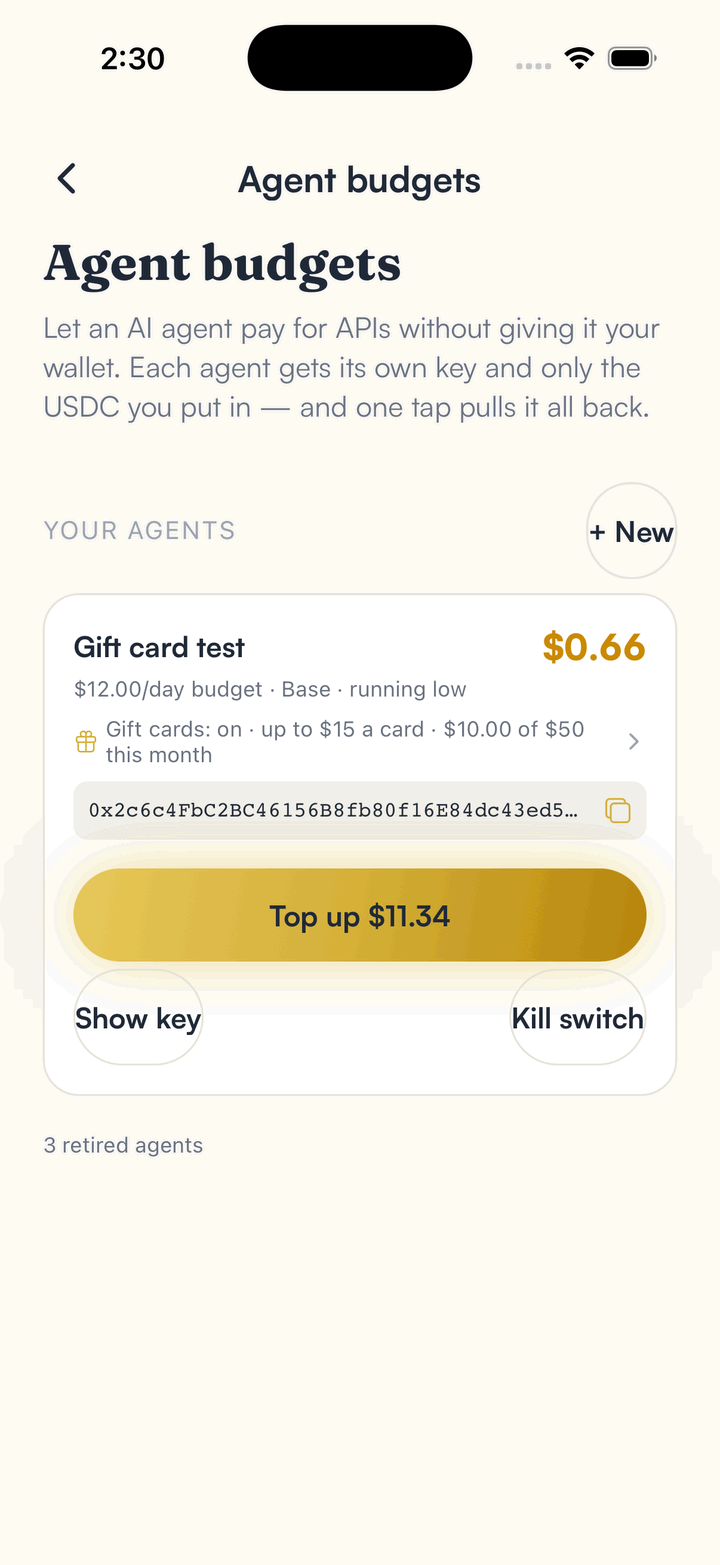
The agent's spending limit is the USDC you choose to put at its address. Because the chain enforces that balance, topping up is just an ordinary send. If the agent needs more room, you send more. If you want to tighten things, you stop topping up. There is no separate rules engine to learn, and the same wallet that holds your money sets the cap.
You can also switch an agent off at any time. Doing so sends its remaining USDC back to you, so a retired or misbehaving agent leaves no stranded balance. See the agent budgets page for the full setup, and our guide to self-custody if you want the background on holding your own keys.
A practical setup for a first agent
Start with a figure you would shrug off losing. The aim is to learn how fast it spends before you decide on a larger budget, and to see which calls it actually makes.
Then match the money to the task. In our own production check on 2 September 2026, an agent paid a SpendTheBits x402 resource on Base mainnet through the CDP facilitator, and it settled in about 1.4 seconds. Fast settlement means an agent can pay mid-task without stalling, which is why a small balance can still do real work. The CDP facilitator behind it has processed more than 100 million x402 payments across Base and Solana [1].
Review the agent's address after each run. Every payment is a public transaction, so you can see exactly what it bought and what is left. Finally, plan the exit: decide when you will switch the agent off and sweep its balance back. If it will buy cards, see how an agent can buy a gift card over x402. Autopay and money streams are not live for real settlement in SpendTheBits yet, so top-ups today are manual sends.
In the app · 3 steps
Give an AI agent a capped budget
Each agent gets its own key and only the USDC you put in.
Create an agent budget
Agent budgets shows each agent, its balance and its daily budget, with Top up and Kill switch.
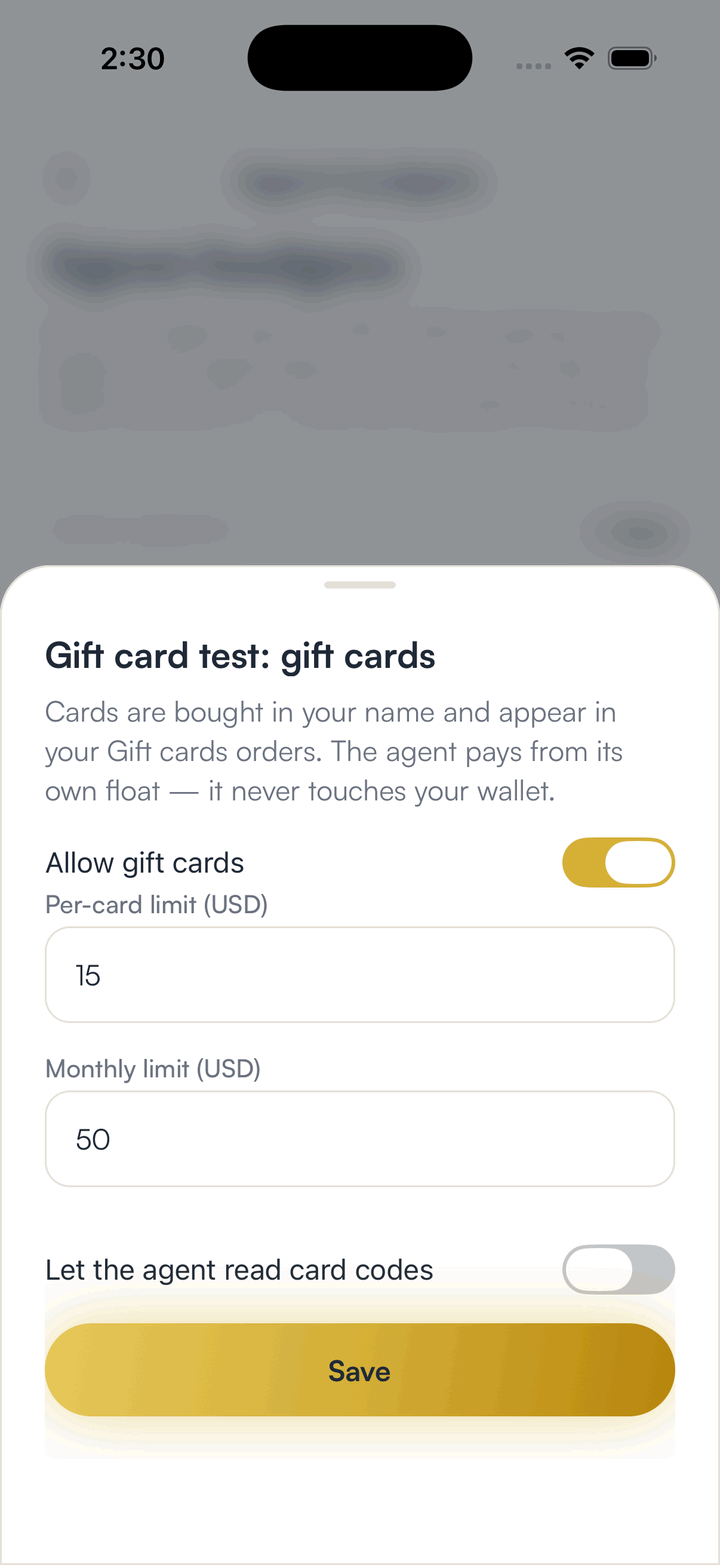
Set what it may buy
Turn on gift cards and set a per-card and a monthly limit.
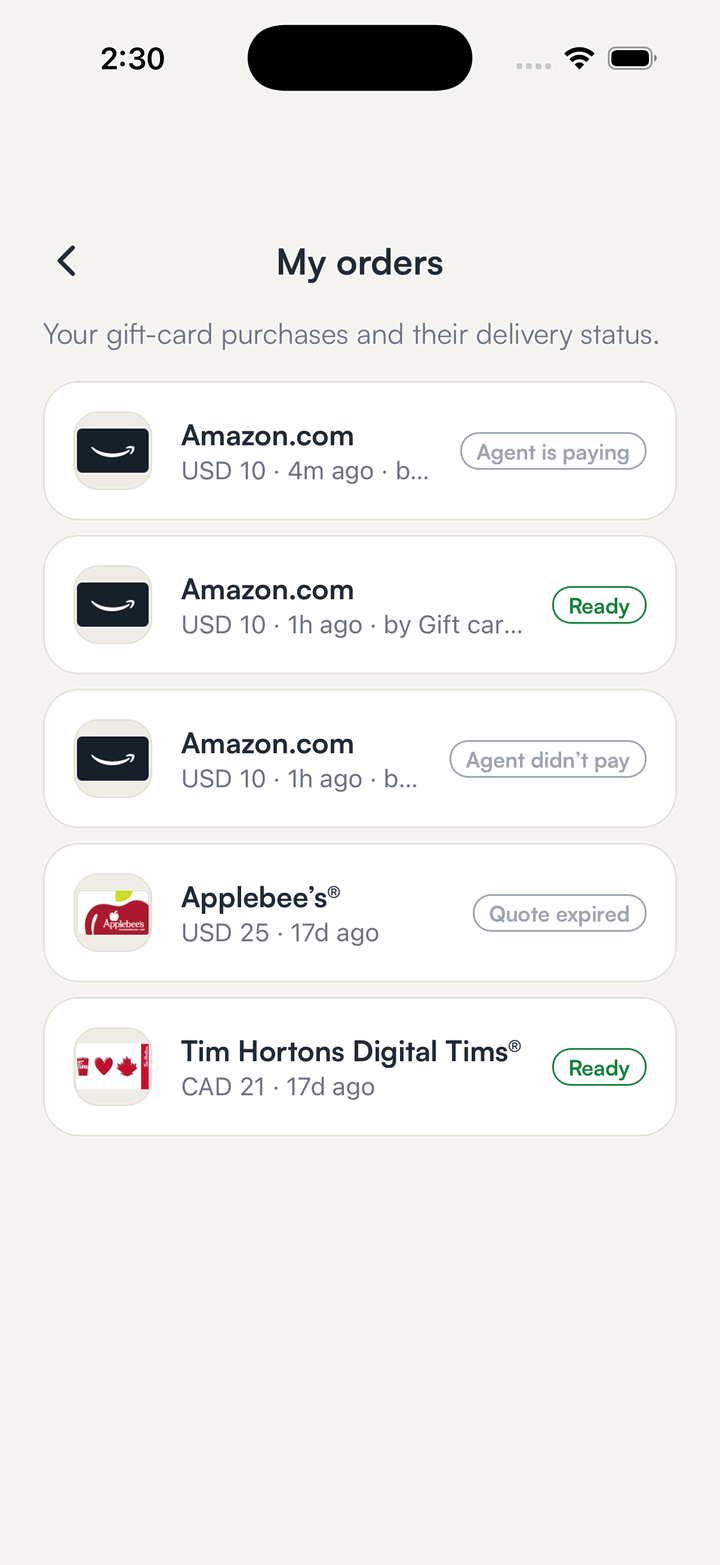
Review its orders
Purchases appear in your orders with the agent that placed them.
Hold your own keys, keep the yield, skip the middleman.
SpendTheBits is a fully non-custodial wallet for 13 chains, free on iOS and Android.