
Why one transaction beats two hundred
A blockchain transaction is one signed instruction. If you want to pay two hundred people, the plain way is to sign two hundred of them. Each one needs its own approval, its own fee, and its own wait. Batching changes the shape of the work: you hand the network a single transaction that contains a list of smaller calls, and the network runs them in order.
On Arc, applications can submit multiple contract calls in a single transaction through a predeployed contract called Multicall3From [1]. Your wallet calls one function, and that function forwards each encoded USDC transfer on your behalf. You sign once, and the chain does the repeating for you.
Bulk payouts in SpendTheBits does this on Arc: one signature on the phone pays a whole pasted list of addresses or @handles in USDC. The saving is not only fees. It is also attention. One review screen, one approval, and one record of the run replace a long afternoon of copy, paste and confirm. For a founder paying a team at month end, that is the difference between a ten-minute task and a half-day chore.
There is a safety angle too. Every manual send is a fresh chance to slip a digit in an address. When the list is reviewed once as a whole, you can read it top to bottom before anything moves, and fix mistakes while they still cost nothing.
What Arc does under the hood
Most batching contracts have a catch. The token contract usually sees the batching contract as the sender, not you [1]. That makes it harder to read the history later, because the on-chain record points at the helper instead of your wallet. Arc's batching contract is built to avoid that.
Multicall3From routes each subcall through Arc's CallFrom precompile, which executes calls on behalf of the original sender [1]. So when a batch of USDC transfers runs, the USDC contract sees your wallet as the sender for every transfer [1]. The Transfer event for each line shows your wallet in the from field, the recipient in the to field, and the amount in base units [1].
There is no single batch event to read. Instead, a successful batch emits one USDC Transfer event per successful transfer, and you verify those [1]. That is handy for accounting, because each payment stays a normal, searchable transfer rather than a blob inside one big record.
The guardrails matter too. You must submit the batch from a plain externally owned account, because calls routed through an intermediary contract with a different sender are rejected [1]. Value-forwarding patterns are not supported either [1]. Arc's own advice is to test your exact call set and failure policy on its testnet before you rely on Bulk USDC payouts in production [1].
One network fee, paid in USDC
Fees are the other half of the story. On Arc, all transaction fees are denominated in USDC, which is the native gas token [3]. That means you do not need a second coin in your wallet just to pay for a payroll run. The balance you are paying people from is the same balance that pays the network.
Arc's fee market uses an EIP-1559 style model with smoothing, so the base fee moves gently rather than lurching with every busy block [3]. The design target is about $0.001 per ERC-20 transfer under normal load [3]. The protocol also sets a floor of 20 Gwei and a ceiling of 20,000 Gwei on the base fee, which bounds the worst case [3].
In our production test on 18 September 2026, a USDC send on Arc cost about 0.001 USDC in network fee, in line with that design target. A batch is one transaction, so it carries one fee wrapper rather than two hundred separate ones.
The practical habit is to show fees in dollar terms, not raw Gwei, because the network is built around a stablecoin-native view [3]. A treasury lead should be able to read the cost of a run as a few cents and move on.
When one line fails
Every batch raises the same worry: what if one payment goes wrong? Each subcall carries an allowFailure setting that decides whether a failed call cancels the whole batch [1]. That one switch defines how the run behaves.
Set it to false when every payment must succeed. If any subcall then fails, the whole batch reverts and nothing moves [1]. That is the strict, all-or-nothing mode, and it suits cases where a partial run would leave your records in a mess.
Set it to true and a failed subcall does not stop the others, but Arc's docs say to do this only when your application explicitly handles the failures [1]. In that mode you must read the result of each line and decide what to do about the ones that did not land.
SpendTheBits makes that result visible. Its Bulk USDC payouts show each line as paid or not paid, so after a run you see which people received funds and which did not, rather than guessing from a single success message. That per-line result is what lets a founder fix two bad addresses and resend only those, instead of redoing the whole list. It is the same reasoning as in our look at stablecoin payroll on Arc, where clear status beats optimism.
Memos turn a payout into a record
A transfer on its own says who got what. It does not say why. Finance teams need the why: which invoice, which sprint, which month. Arc has a Memo contract for exactly this, which attaches application metadata, such as an invoice or order reference, to a contract call [2].
The Memo contract wraps the call and emits the metadata as events, so wallets, exchanges, and indexers can reconcile onchain transfers against offchain records [2]. Like batching, it keeps the original wallet as the sender, so a USDC transfer still sees you, not the Memo contract [2].
On success, the contract emits an ordered trail: a BeforeMemo event, the target contract events such as the USDC Transfer, and then a Memo event carrying the sender, target, a hash of the call data, your memo identifier and the memo bytes [2]. You can query Memo events by indexed fields such as the identifier, the sender and the target [2].
In SpendTheBits, each payment in a bulk run can carry a short memo written on chain through Arc's memo contract. Keep one thing in mind: memos are public and permanent, so write a reference like a batch number, never a private detail about a person. For the wider picture of how this fits a treasury workflow, see our founders and treasuries page.
Doing it in SpendTheBits
You paste a list or CSV of addresses or @handles, add amounts and optional memos, review the batch, and approve it with one signature on your phone. Bulk USDC payouts run in USDC on Arc, and network gas is paid in USDC, so you need no second coin. There is no SpendTheBits fee on bulk payouts today.
Because SpendTheBits is fully non-custodial, the key and the signing stay on your device. The backend prepares context and relays the signed transaction, but it never sees a seed or private key and cannot move your funds. That matters for a treasury: the person holding the phone is the only one who can approve a run.
Safety checks run before anything moves. Every recipient is screened against sanctions lists first, and spending guardrails apply to the batch total, so a cap you set for a day covers the whole run, not each line. A batch holds up to a few hundred people. To learn how to set limits, read our help page on spending guardrails.
Afterward, results export as a CSV for the books, with each line marked paid or not paid. Pair that with the memos on chain and your reconciliation has two matching trails. Autopay and money streams are not live for real settlement yet, so each batch is a run you start and sign yourself. For the broader payroll picture, see how to run payroll in USDC.
In the app · 4 steps
Pay a list of people in one signature in SpendTheBits
Bulk payouts lives under Arc tools. Here is the path from a pasted list to a batch you can export.
Start a batch
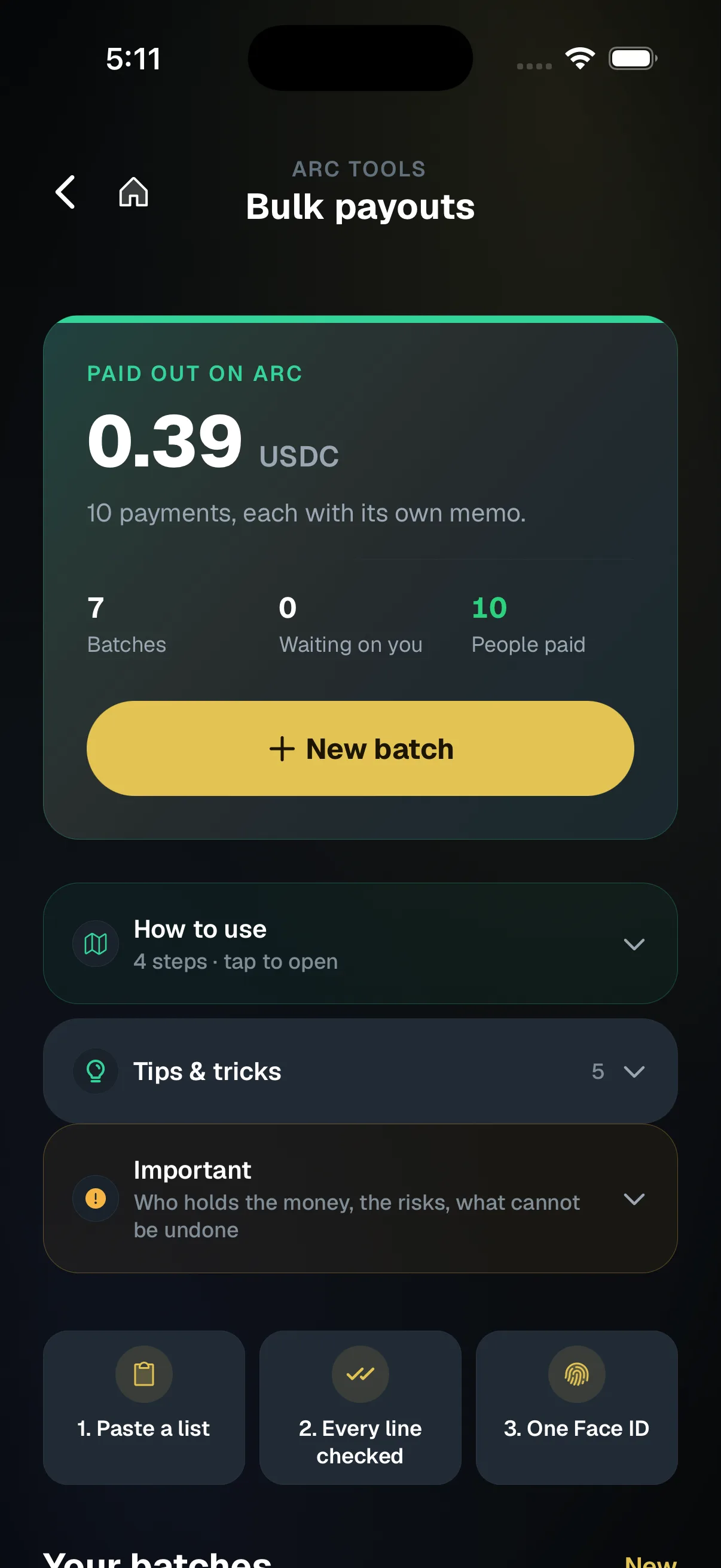
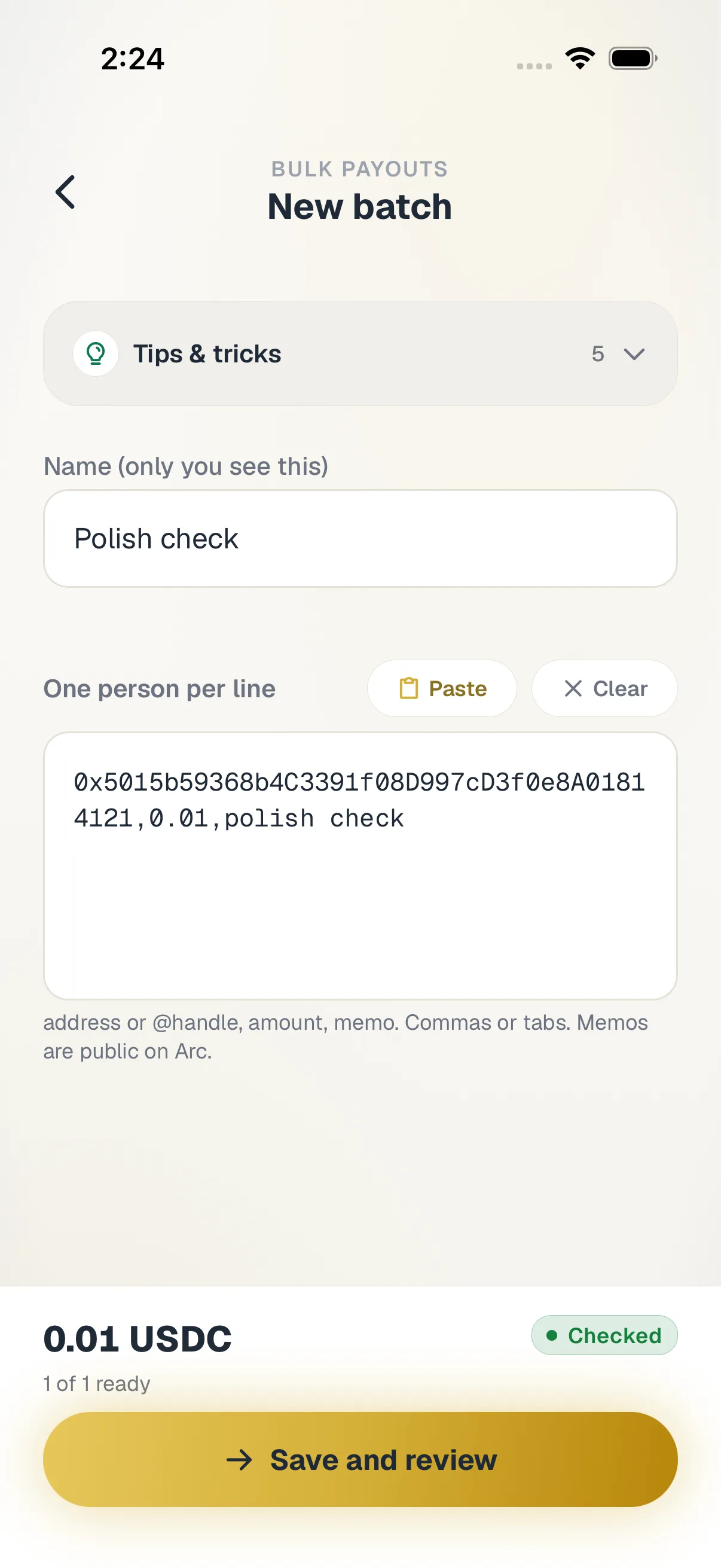
Go to Arc tools, then Bulk payouts, and tap New batch.
Paste the list
Paste one person per line: address or handle, amount, optional memo. Tap Check the list to see problems under each line.
Review and sign once
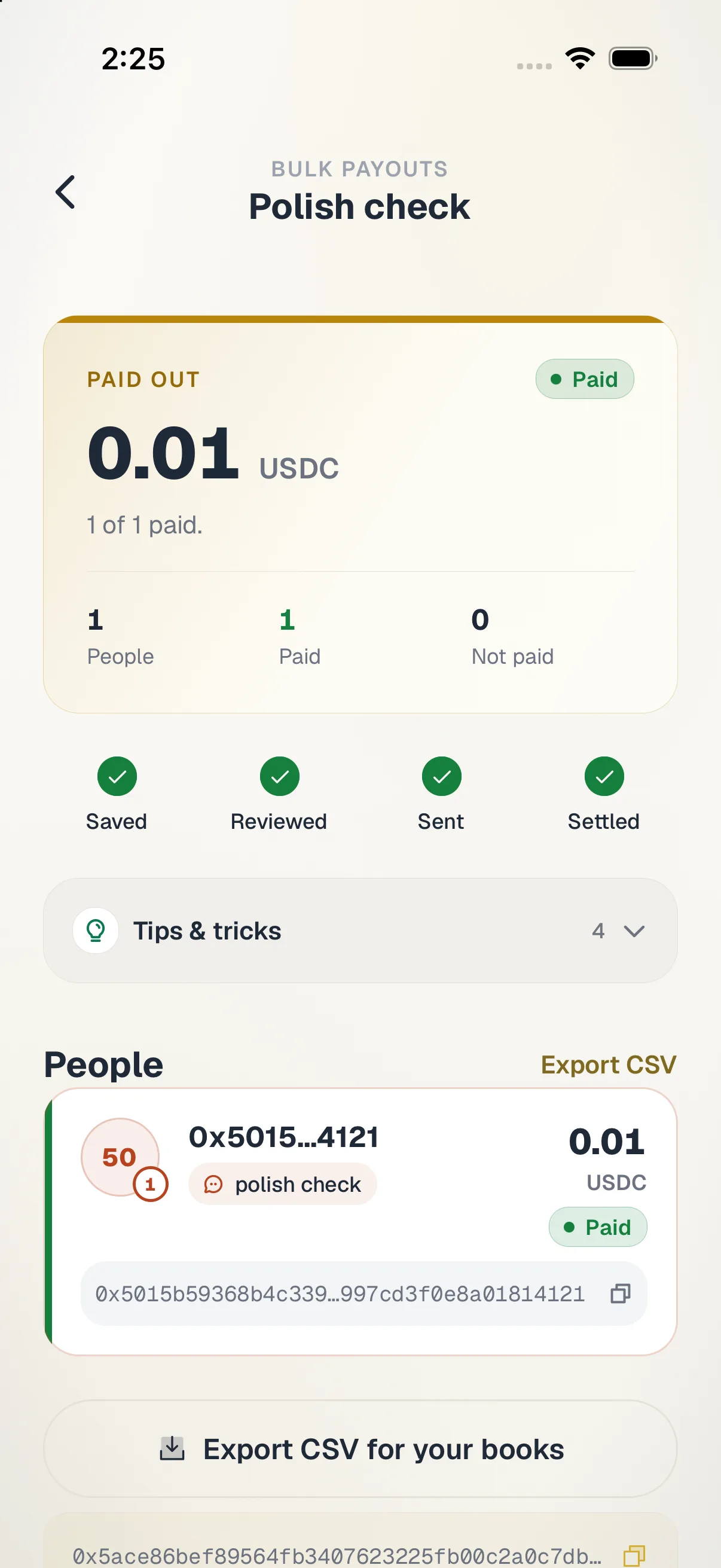
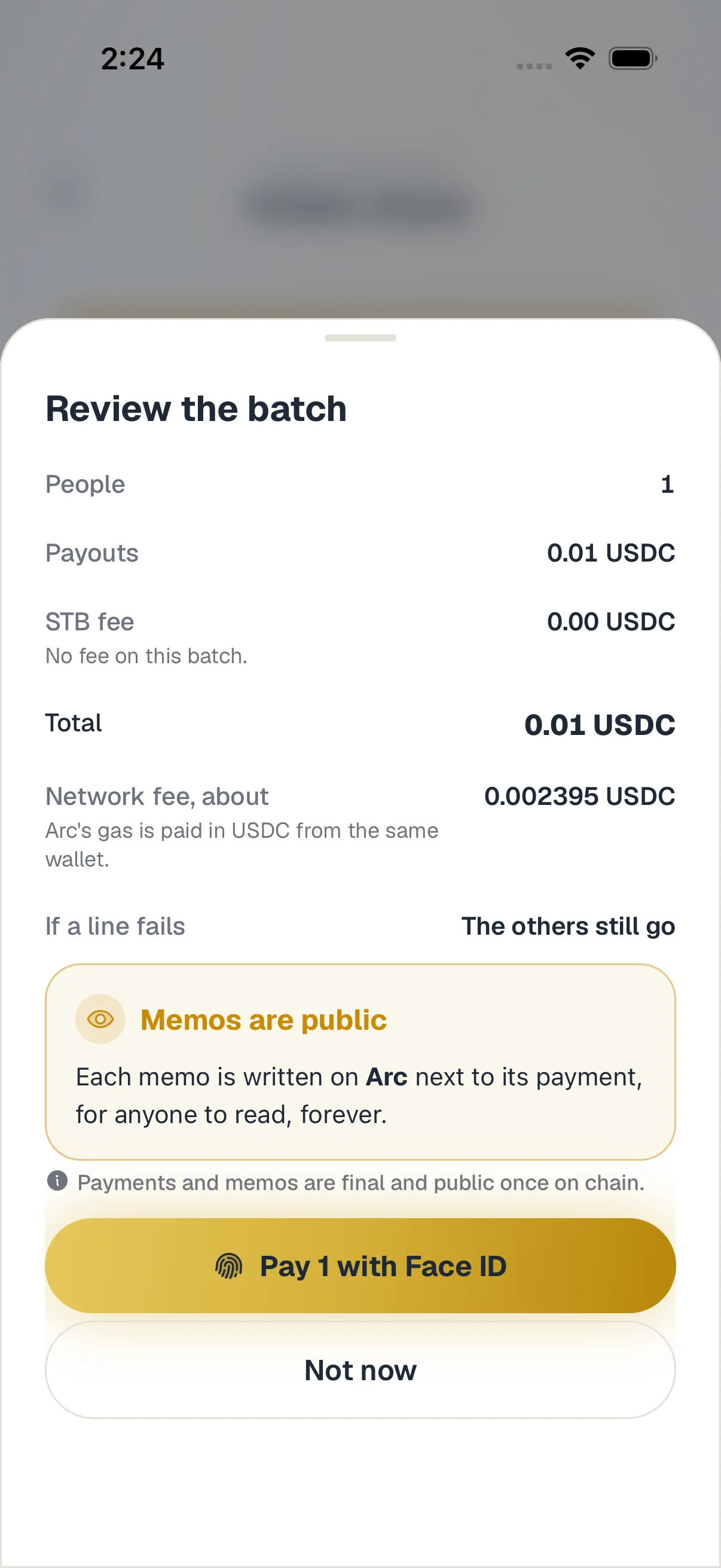
Check people, payouts, total and the network fee, then pay everyone with one Face ID.
See every line
Each line shows Paid or Not paid, and the batch exports as a CSV for your books.
Hold your own keys, keep the yield, skip the middleman.
SpendTheBits is a fully non-custodial wallet for 13 chains, free on iOS and Android.