

The Problem with Traditional Bitcoin Transactions
Traditional invoices over Lightning are encoded in Bech32 and are often displayed as QR codes [3]. If you reuse the same address on your website, you compromise your financial privacy. Anyone can look up your public key on the ledger and see your total balance. This makes static keys highly undesirable for public tipping.
Furthermore, the main blockchain has limited space for transactions, which can cause severe network congestion. When traffic is high, users must pay high fees to get their transfers confirmed quickly. This works well for large transfers but is completely unsuitable for tiny digital tips. If a fan wants to send you two dollars, they cannot pay five dollars in network fees. You can explore the differences in network costs to see how these fees compare.
Traditional payment options also rely on centralized processors that can freeze your account at any moment. As a creator, you deserve to own your relationship with your supporters. This is why many independent workers now choose self-custodial options to protect their earnings. They want to keep full control of their money. By shifting away from standard on-chain transactions, you can build a more resilient financial foundation.
How Lightning Addresses Simplify Content Tipping
A Lightning address looks exactly like a standard email address [4]. Senders do not have to copy a long, confusing string of letters and numbers. Your supporters can simply type this human-readable format into their favorite wallet [1]. It is a static identifier, meaning you can print it on merchandise, add it to your social media bio, or show it on your stream. Senders do not need a new code every time.
Behind this simple email-like format lies a protocol that coordinates the transaction in real time. Senders input your address, and their wallet talks to a server to get a unique invoice [4]. This means you get the convenience of a static tip jar. Supporters enjoy a seamless checkout experience, and you receive your funds within seconds without any manual work. It makes supporting independent content creators completely frictionless.
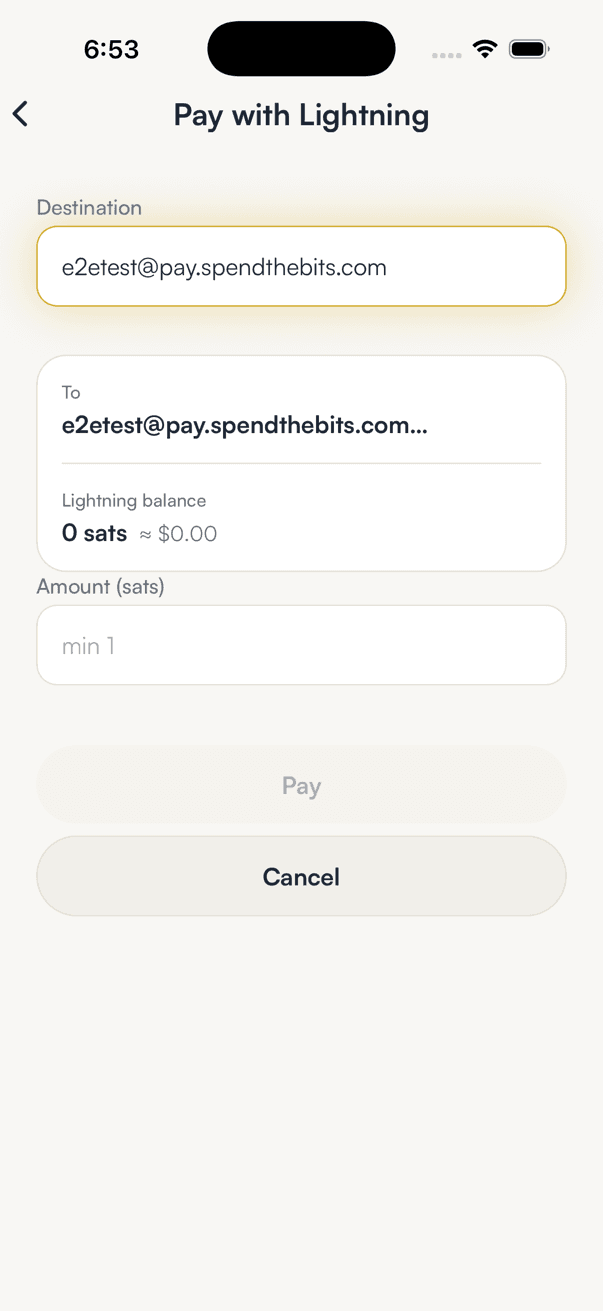
This technology makes it practical to accept micro-tips from supporters all over the world. A reader can tip you ten cents for a great article, or a viewer can send fifty cents during a live stream. These small payments are processed instantly because they bypass the slow confirmation times of the main blockchain. To help you visualize this in action, you can see how to input these details on our screen below.
Under the Hood: Converting Addresses to Invoices
To understand how this works, we must look at the underlying standards. The Lightning address uses a protocol known as LUD-16, which defines how to pay static internet identifiers [1]. When a wallet sees an address like satoshi@bitcoin.org, it makes a secure web request to that domain [1]. Specifically, it contacts a special directory on the website to request payment parameters [1]. This protocol is restricted to lowercase letters, numbers, and basic symbols [1].
When a wallet makes a GET request to the service, it receives a JSON response containing a callback URL, maximum and minimum sendable amounts, and metadata [2]. Senders choose how much to send, and the wallet requests a customized payment invoice from the service [2]. This invoice is encoded using the BOLT-11 standard, which contains a timestamp, a signature, and a payment hash [3]. To process a payment, the user's wallet automatically performs a GET request to the service [2].
The invoice is verified by the sender's wallet to ensure the amount is correct [2]. Once verified, the payment travels through the peer-to-peer network to reach your wallet. This entire process happens in the background in less than two seconds. Because the server handles the initial request, you can receive payments even when your phone is turned off. This makes it the perfect setup for creators who want to accept donations around the clock.
Keeping Control with Fully Non-Custodial Wallets
When you start accepting digital tips, you must choose how to store your funds. Many beginners start with custodial accounts because they seem convenient, but this means a third party holds your private keys. If that company goes bankrupt or faces regulatory issues, you could lose your entire balance. You can read our guide to custodial versus non-custodial options to understand the security options.
A non-custodial wallet gives you full ownership of your earnings. The keys and recovery seed are stored only on your own device. This means no company, bank, or government can freeze, move, or reverse your transactions. When you control your keys, you are the sole guardian of your digital assets. This setup is highly recommended for creators who rely on their tipping income to pay for rent or production gear.
However, self-custody comes with the personal responsibility of securing your backup. If you lose your phone and have no backup, your funds are gone forever. For this reason, we suggest reading about securing your recovery phrase to keep your wallet safe. Write down your seed phrase on paper and keep it in a safe place. This is the best way to protect your tips from loss.
Reporting Your Digital Earnings to the Tax Authorities
If you want to try getting paid in Bitcoin for services, you must report that income on your tax return [5]. In many countries, digital assets are treated as property rather than currency for tax purposes [5]. This means every tip you receive is considered taxable income at its fair market value in your local currency [5]. For example, if someone tips you worth five dollars, you must record that five dollars as ordinary income [5].
If you hold the digital asset and it gains value before you spend it, you may also owe capital gains taxes [5]. The tax rate depends on whether you held the asset for more than a year [5]. To stay compliant, you must keep detailed records of every transfer. You need to log the date, amount, and fair market value [5]. This can be difficult to manage manually if you receive hundreds of small tips.
Fortunately, modern tools can help you organize these details automatically. Using a wallet with built-in export features can save you hours of manual spreadsheet work at the end of the tax year. We recommend checking our tutorial on generating tax reports to learn how to export clean histories. Keeping clean logs ensures that you can focus on creating great content without worrying about tax compliance issues.
Getting Set Up with SpendTheBits
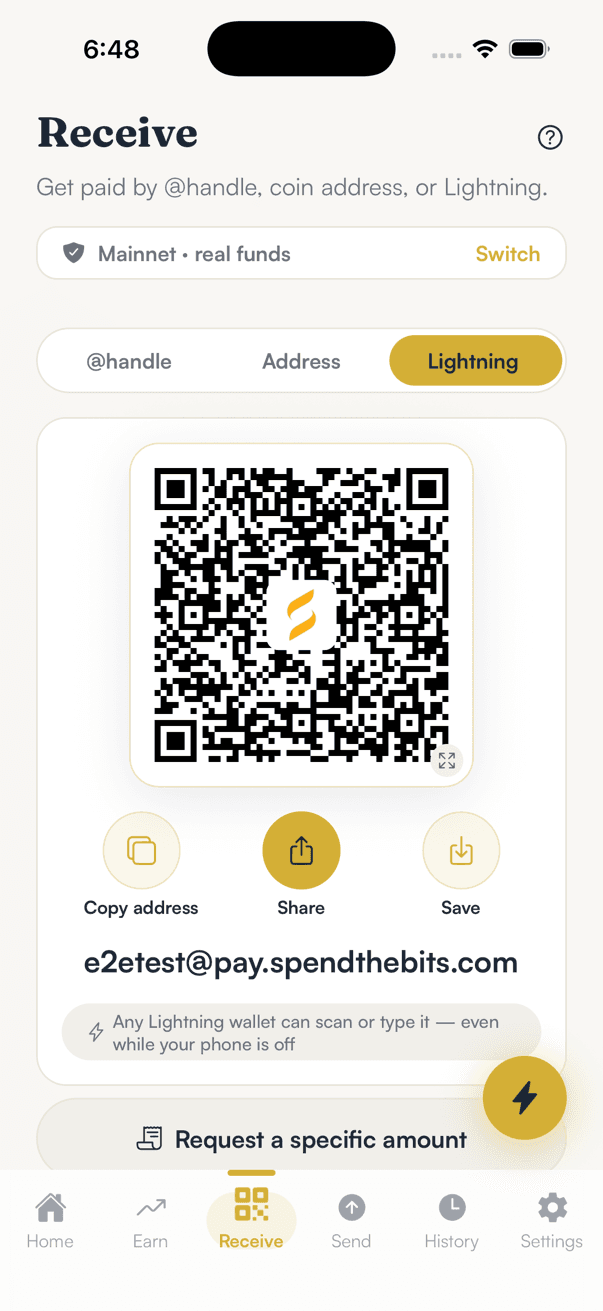
SpendTheBits offers a fully non-custodial multi-chain wallet that makes getting paid in Bitcoin simple. In our wallet, any creator who claims a username in their profile gets a personal Lightning address. This address is formatted as handle@pay.spendthebits.com and is located under the Lightning tab on the Receive screen. You can easily copy this address and paste it on your website or share it with your audience.
Our wallet is built on the Breez Spark SDK for Lightning, ensuring that your keys remain securely on your mobile device. SpendTheBits charges no fee of its own on Lightning payments, so all routing charges go directly to the Lightning network. This ensures that you keep the maximum amount of your tips. Because our backend only stores public data, we never see your seed phrase and cannot freeze or move your funds.
If you are ready to explore getting paid in Bitcoin, you can read how to claim your address to set up your profile today. SpendTheBits is available for both iOS and Android, bringing self-custodial finance directly to your pocket. By using our platform, you can enjoy secure, direct relationships with your global supporters. Let your fans back your work using the most efficient payment network in the world.
In the app · 4 steps
Take Lightning tips in SpendTheBits
Everything a supporter needs is one address you can put in a bio. Here is how to get it and share it.
Open Receive, then Lightning
Your address appears as a QR code with Copy, Share and Save underneath, spelled out in full so it can be typed by hand.
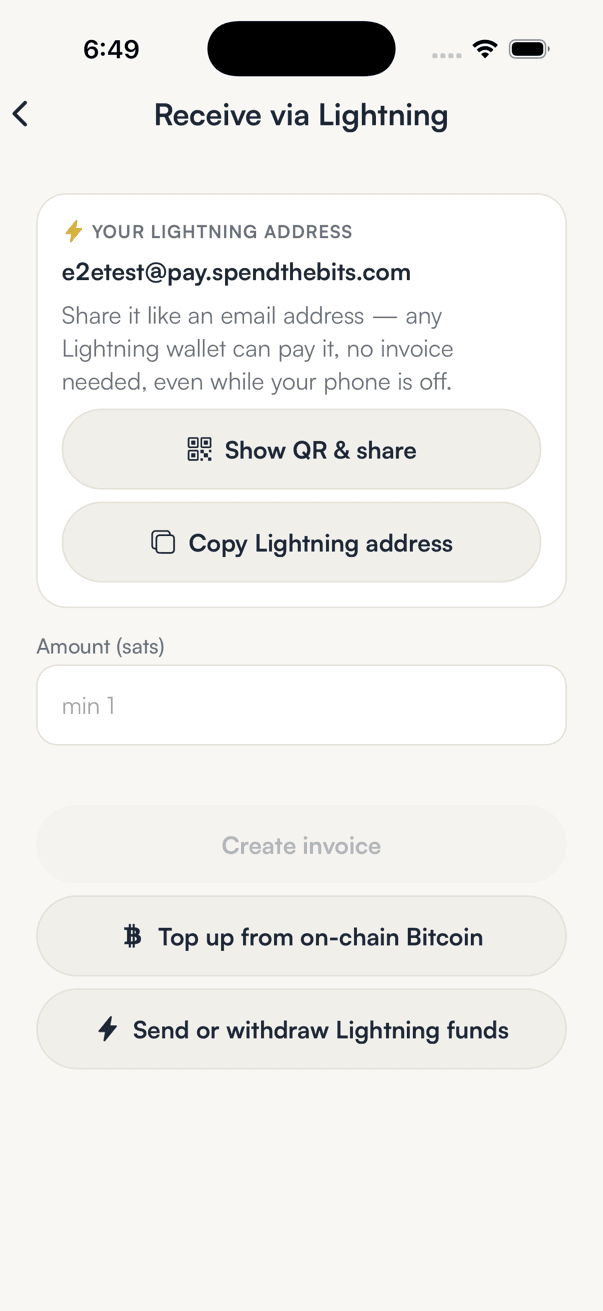
Ask for a specific amount
For a paid post or a commission, enter the amount and the invoice carries it, so the supporter does not have to guess.
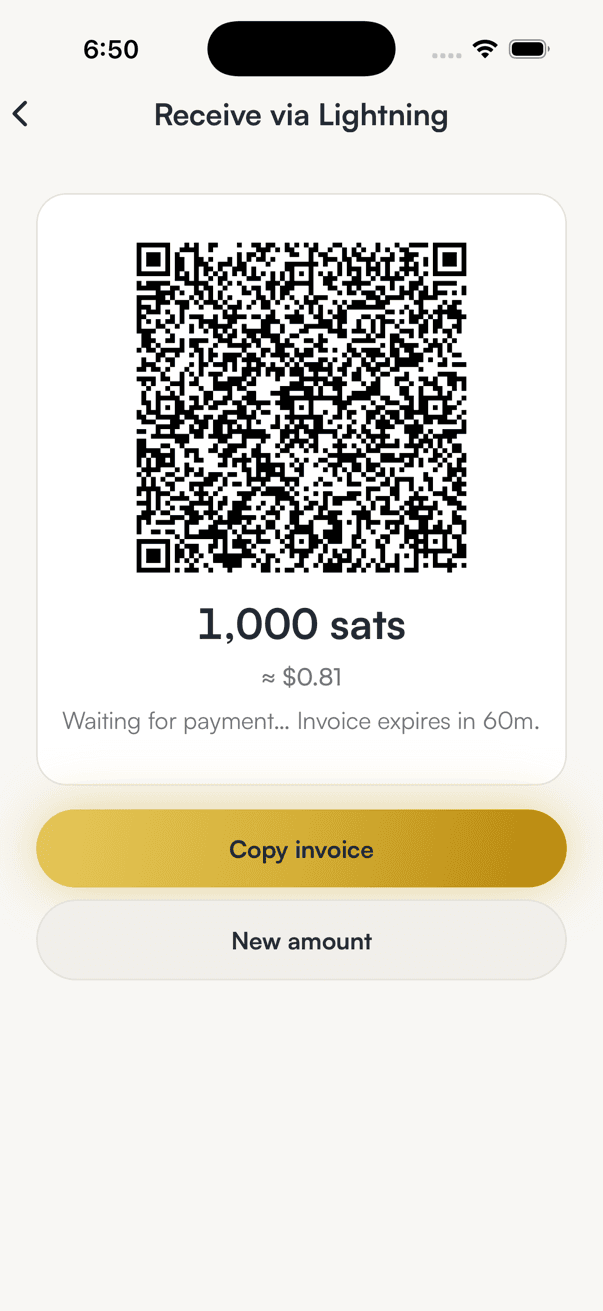
Share the invoice
The invoice is a QR code and a string. Either works, and both point at a wallet only you control.
Watch it arrive
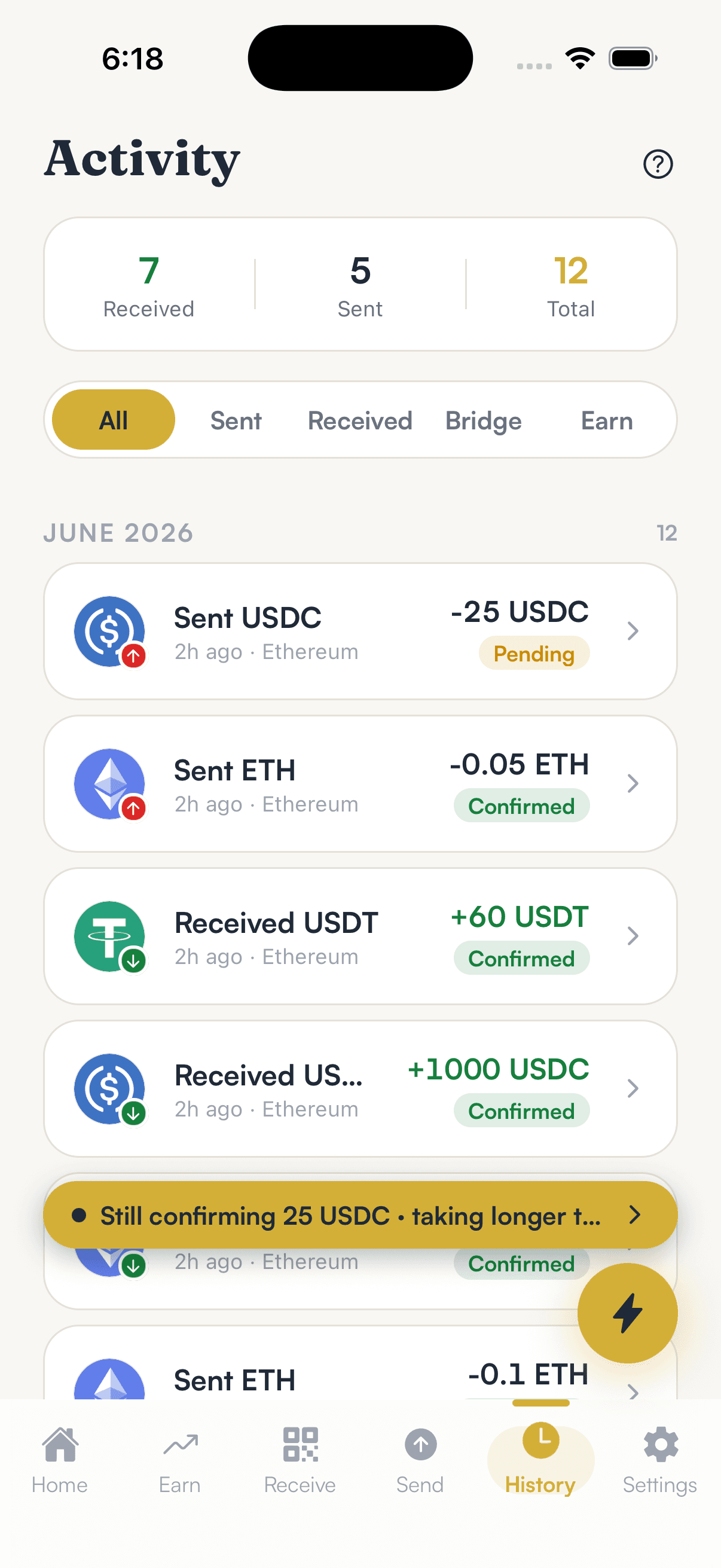
Payments land in Activity with the amount and time, ready for your books at the end of the month.
Hold your own keys, keep the yield, skip the middleman.
SpendTheBits is a fully non-custodial wallet for 13 chains, free on iOS and Android.