
What happens at the counter, start to finish
Picture a small shop. The cashier types the price into a phone and a QR code appears. The customer scans it with any wallet that can pay USDC on the right network, checks the amount and approves. Moments later the cashier's screen flips to paid and the customer leaves with the goods. That is one pass through a USDC checkout.
The first job belongs to the request. The code carries the recipient, the token, the network and the amount, so the customer does not type an address by hand. Typing is where mistakes and scams creep in, which is why a scannable request matters at a counter. The customer only has to confirm what is already on screen.
The second job belongs to the chain. The seller needs proof that the money arrived and cannot be pulled back. The third job is bookkeeping: the seller needs to know which sale a payment belongs to. We take these in turn below, starting with the request itself, since every other step depends on it being right.
In SpendTheBits, Checkout follows this shape. A seller types an amount on their phone and shows the QR code. The customer pays USDC on Arc from any wallet, and the screen shows Paid about a second after the payment lands. The customer does not need SpendTheBits to pay.
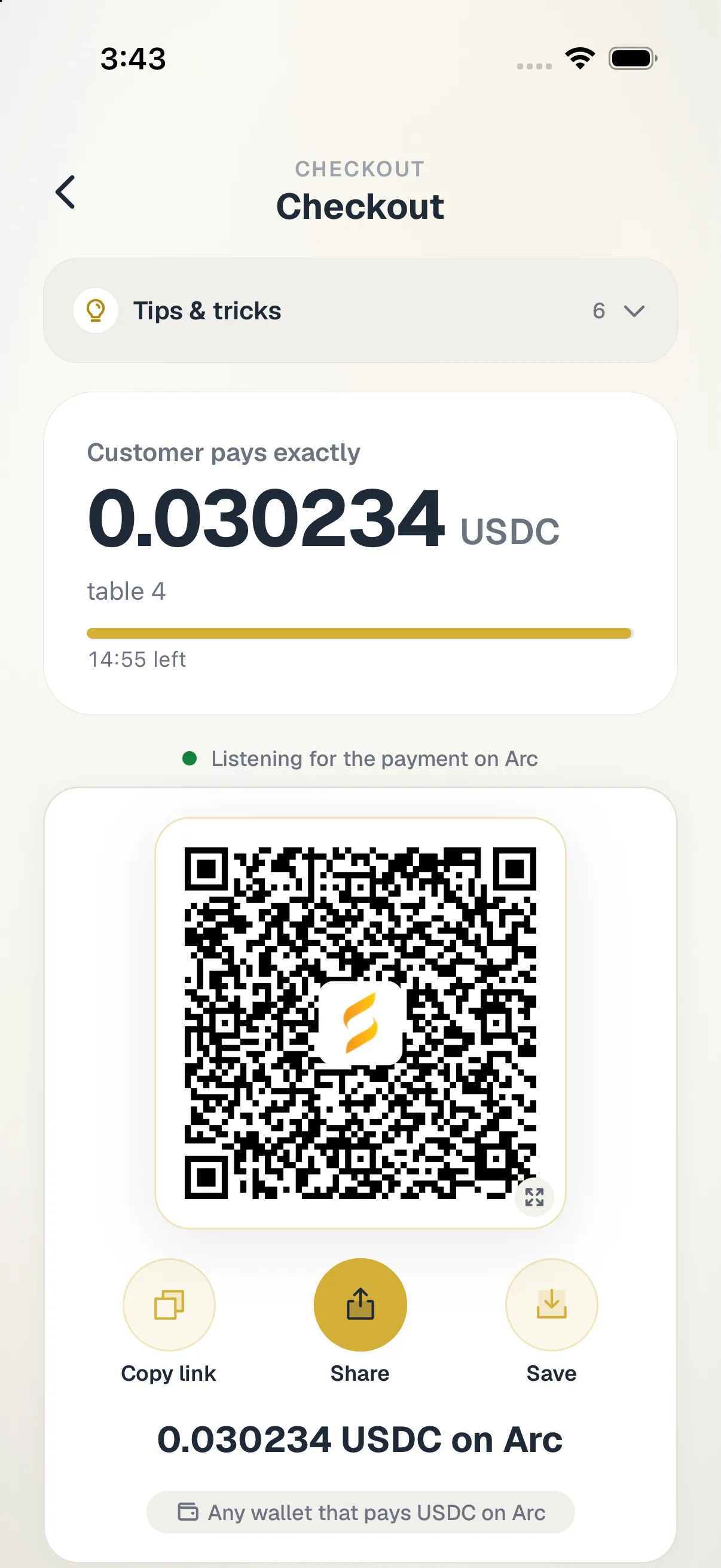
The QR code is a payment request, not a wallet address
The format behind the QR code is a public standard. ERC-681 defines a URL that represents a transaction request, especially a payment in ether or an ERC-20 token [2]. It was written so that a URL in a QR code, a link or a chat message can open the user's preferred wallet with the payment already filled in [2]. The customer only confirms.
For a token like USDC, the URL asks the wallet to call the token's transfer function. It names the token contract, then passes the beneficiary address and the amount in atomic units [2]. A chain ID can also be included, so the wallet knows which network the request is for [2]. That detail matters on a multi-chain stablecoin, where the same token exists in many places.
The standard admits its limits. The amount is only a suggestion, and the payer may change it [2]. It also warns that altering the recipient or amount is a profitable attack, so the request should come from a trusted source [2]. At a counter, that source is your own screen, so show the code only on a device you control.
SpendTheBits uses this same family of formats on Receive. A requested amount makes the QR name the asset and, on EVM chains, the chain, using EIP-681 on Ethereum-style chains. Where a format cannot name the asset safely, the QR keeps the bare address and the amount is shown in words. That fallback is a quiet safety feature, not a gap.
Why finality decides when you hand over the goods
On a card network you hand over the goods on an approval and sort out the rest later. With a blockchain payment, the question is different: can the payment still disappear? On many chains the answer is a soft maybe for a while, which is why wallets show a count of confirmations. A shopkeeper cannot stand at the till watching a progress bar.
Arc removes that wait by design. Its wallet docs describe deterministic finality: transactions finalize in under one second with no risk of reorganization [1]. They go further and tell wallet builders that one confirmation is final, so the old pattern of X of N confirmations should go [1]. Arc uses two states, pending or final, and nothing in between [1].
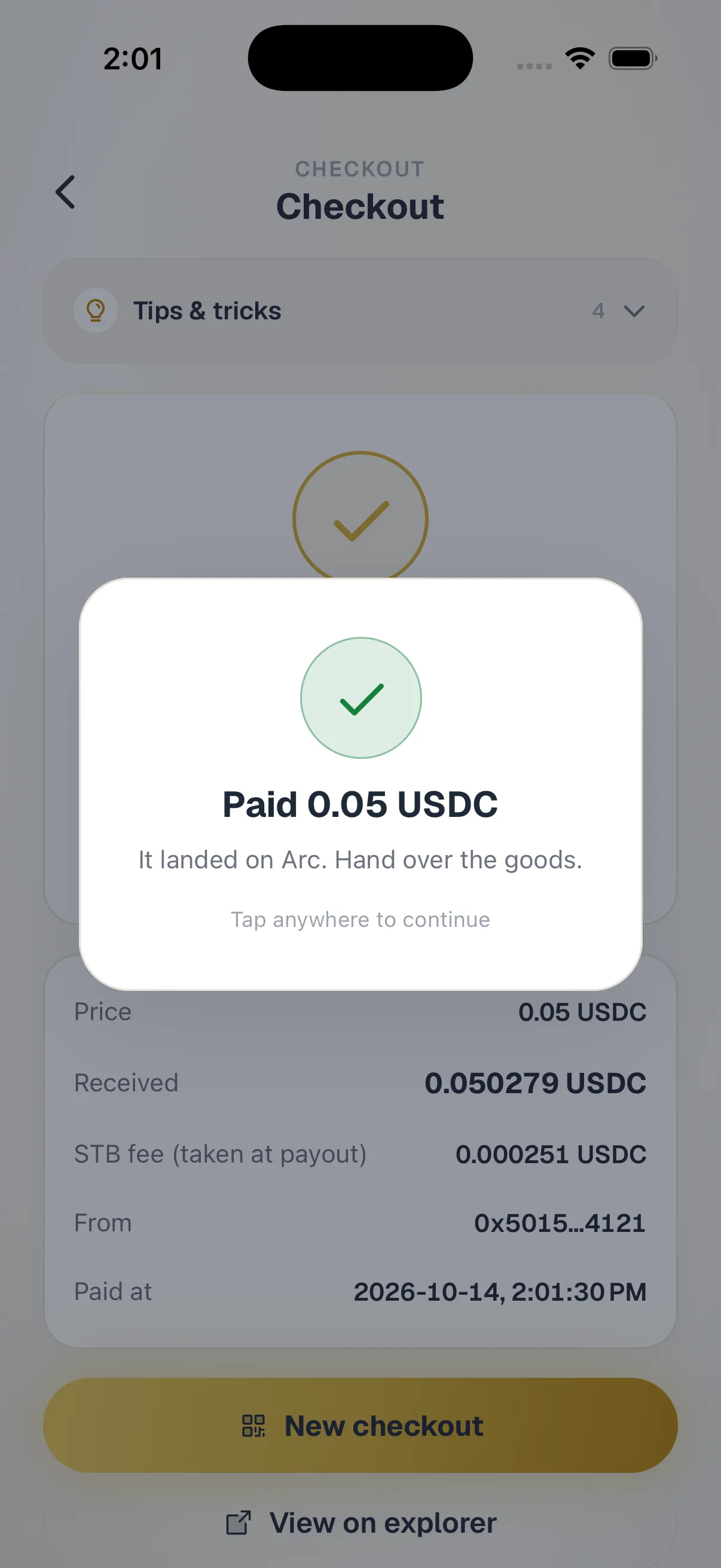
For a seller, that turns the handover rule into something simple. Wait for final, then give the goods. In the app, the Paid screen appears about a second after the payment lands, which matches what finality in under one second implies. Our guide to Arc deterministic finality for payments goes deeper on why this matters.
One honest caveat belongs here. A payment can also fail. Arc enforces a blocklist on USDC at runtime, and if the sender or the recipient is blocklisted the call reverts, which shows up as a receipt with status 0 [1]. A good checkout reads the result of the transaction, not just the fact that one was sent.
Matching a payment to an order
Cards give you an order number for free. A wallet transfer does not. All the chain shows is an amount, a sender and a time. If two customers each pay the same price within the same minute, which one paid for which basket? At a busy counter that question gets real fast.
The cleanest fix asks nothing extra of the customer. Add a tiny unique amount to each sale, a few millionths of a dollar, so every open order has its own total. USDC on Arc uses six decimals at the token level [3], leaving room for that suffix without a visible change in price. The payment then matches its order on its own.
SpendTheBits Checkout does exactly this: each checkout adds a few millionths of a dollar to the amount, so a payment matches its order by itself. Orders, a CSV export for today and an optional signed webhook live in the app, so a seller can see paid orders in one place and feed them to their own systems.
For sellers who want a richer note on a payment, Arc has other tools. If you pay people in bulk, a short memo can be written on chain, and our write-up on USDC payment memos for Arc reconciliation covers that. For one-off counter sales, the unique amount is usually enough.
Where the money goes and what it costs
A good checkout should never become a middleman holding your cash. In SpendTheBits, sales go to the seller's own address through a payout contract nobody owns, which also pays a small SpendTheBits fee. SpendTheBits never holds the money. The wallet is non-custodial: keys live on the device and every transaction is signed there. For the broader idea, see our guide to non-custodial wallets.
The customer's side of the cost is gas. Arc takes all transaction fees in USDC, so there is no second coin to buy first [3]. Arc's design target is about $0.001 per ERC-20 transfer under normal load [3]. In our own production test on 18 September 2026, a USDC send on Arc cost about 0.001 USDC in network fee, which lines up with that target.
The seller does not need to understand any of that to take a payment, but it explains why small purchases make sense on this network. A network cost of a tenth of a cent barely dents a two dollar sale. Our overview of USDC transfer fees compares networks if you are weighing options.
USDC itself is issued by Circle, and Circle describes it as a regulated digital currency redeemable 1:1 for US dollars [4]. That is the issuer's own claim, and it helps to know who stands behind the token you are accepting. For a wider look at the topic, our guide on how to accept USDC payments goes deeper.
Refunds are a new payment, never an undo
Card refunds feel like a reversal, but a blockchain payment is final. ERC-681 itself notes that these transactions are irreversible [2], and Arc's finality means there is no window in which a payment quietly rolls back [1]. So a refund at a counter is not an undo. It is a second payment, sent the other way, by the seller.
That fact should shape your shop policy before the first sale. Decide who may approve a refund, how you confirm the item came back, and whether a partial refund is allowed. Because the seller signs the refund, the buyer cannot force one, and because it is a plain send, the rules are yours to set.
SpendTheBits Checkout works this way. A sale is final on chain, and refunds are never automatic. The seller sends one from their own wallet, signed on their phone, up to the sale amount, and the SpendTheBits fee is not returned. That last detail is worth telling staff about, since a refunded sale still cost the shop its fee.
If you run a team, pair this with spending limits so a refund cannot drain the till. Our post on crypto spending limits and allowlists explains caps and delays. Also, Arc is run by Circle, which issues USDC and can block an address from sending or receiving it, a fact the Arc tools notes ask you to read first.
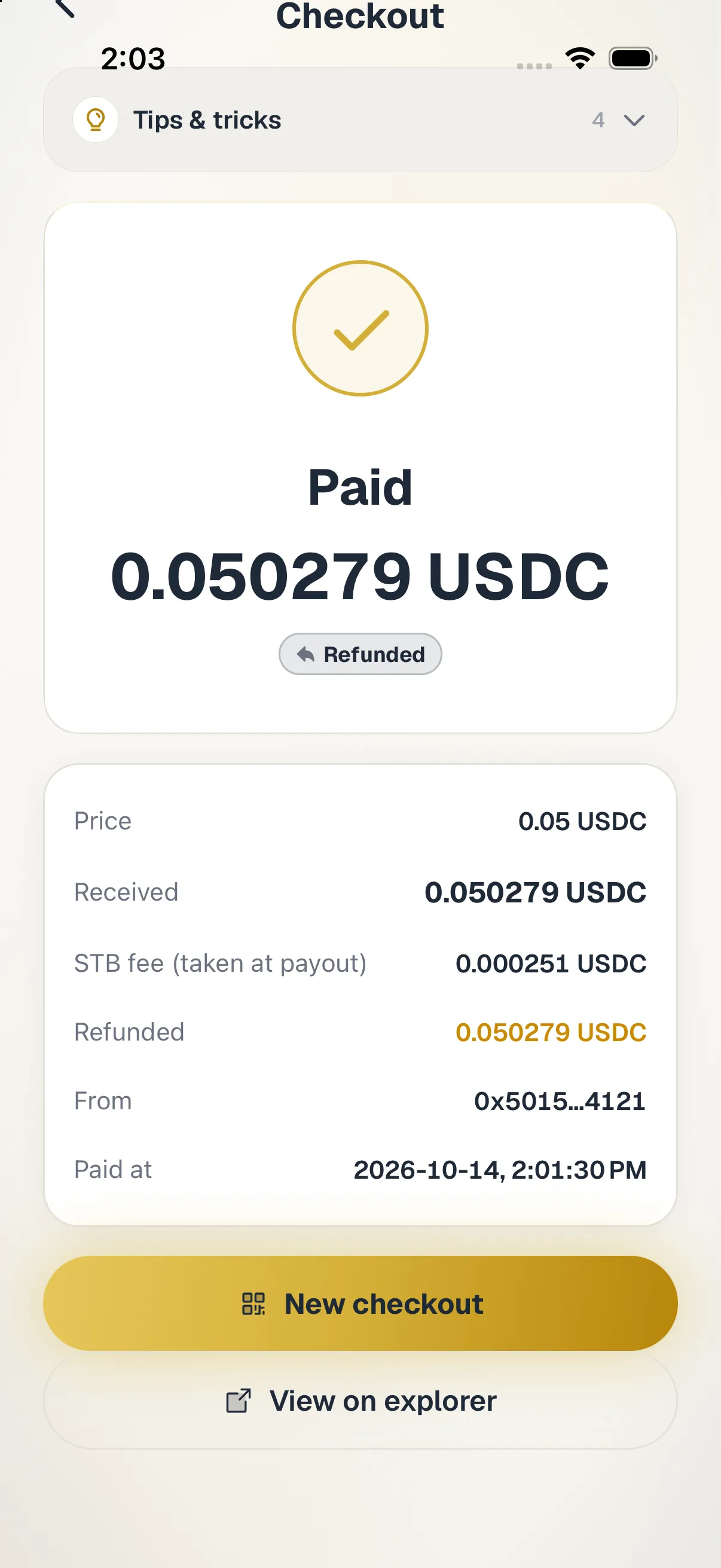
In the app · 4 steps
Take a USDC payment at the counter in SpendTheBits
Checkout lives under Arc tools. Here is the path from typing an amount to a sale you can refund if you need to.
Open Checkout
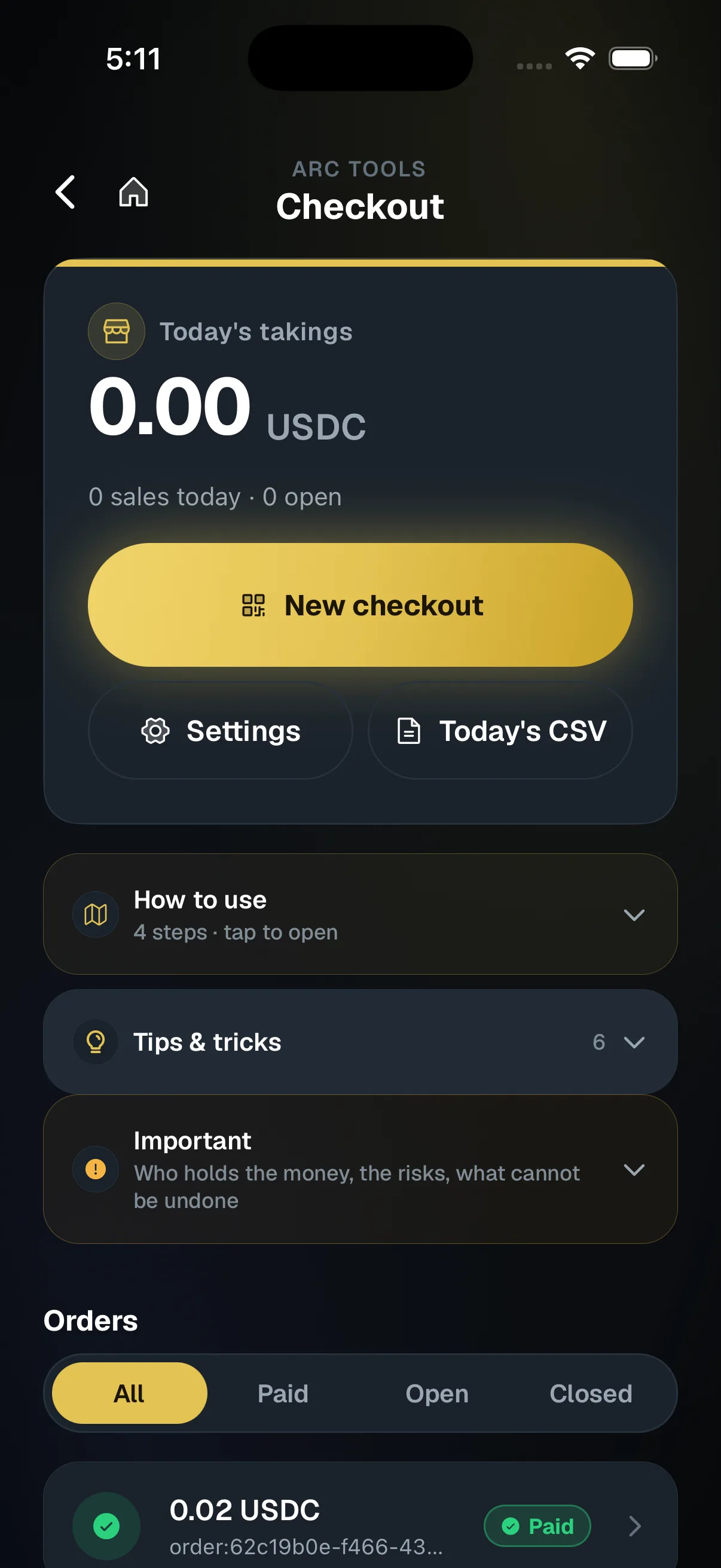
Go to Arc tools, then Checkout, and tap New checkout. Today's takings and open orders sit at the top.
Show the QR
Type the amount and show the QR. The customer pays USDC on Arc from any wallet, and the screen listens for it.
Wait for Paid
The screen flips to Paid about a second after the payment lands. Hand over the goods only then.
Refund from your own wallet
Open the order and tap Refund. You sign it on your phone, and it is sent from your own wallet.
Hold your own keys, keep the yield, skip the middleman.
SpendTheBits is a fully non-custodial wallet for 13 chains, free on iOS and Android.